

The Open-Source Agent Toolkit in 2026
The seven layers that survive production, and the open-source pick for each.

🧭 Part 14 of the 🤖 Agents course
You spent three weeks shipping an agent. It worked in the demo. Then production hit, and you realized the framework you picked has no checkpointing, the memory layer is a flat vector dump with no temporal reasoning, the browser tool falls over on any site with a canvas element, and the eval suite is a Notion doc someone keeps forgetting to update.
The open-source toolkit for building agents in 2026 has solved most of these problems. The catch is that it has solved each one in a dozen incompatible ways. The memory framework that wins LoCoMo (the standard long-conversation memory benchmark) runs 340x heavier per conversation than the runner-up, a difference no benchmark column shows. The same gap between benchmark score and production behavior shows up at every layer.
So the best way to zero in on the constraint your system will hit first under load: latency budget, audit trail, model portability, or language stack. Get this wrong and you rewrite your state schemas in week three.
TL;DR
If you read The AI Agents Stack (2026 Edition), this is the open-source half. Same seven layers around the think-act-observe loop from What is an AI Agent?: orchestration, memory, tool interface, browser/CUA, coding agents, evals & observability, and inference. Here’s where to start at each layer.
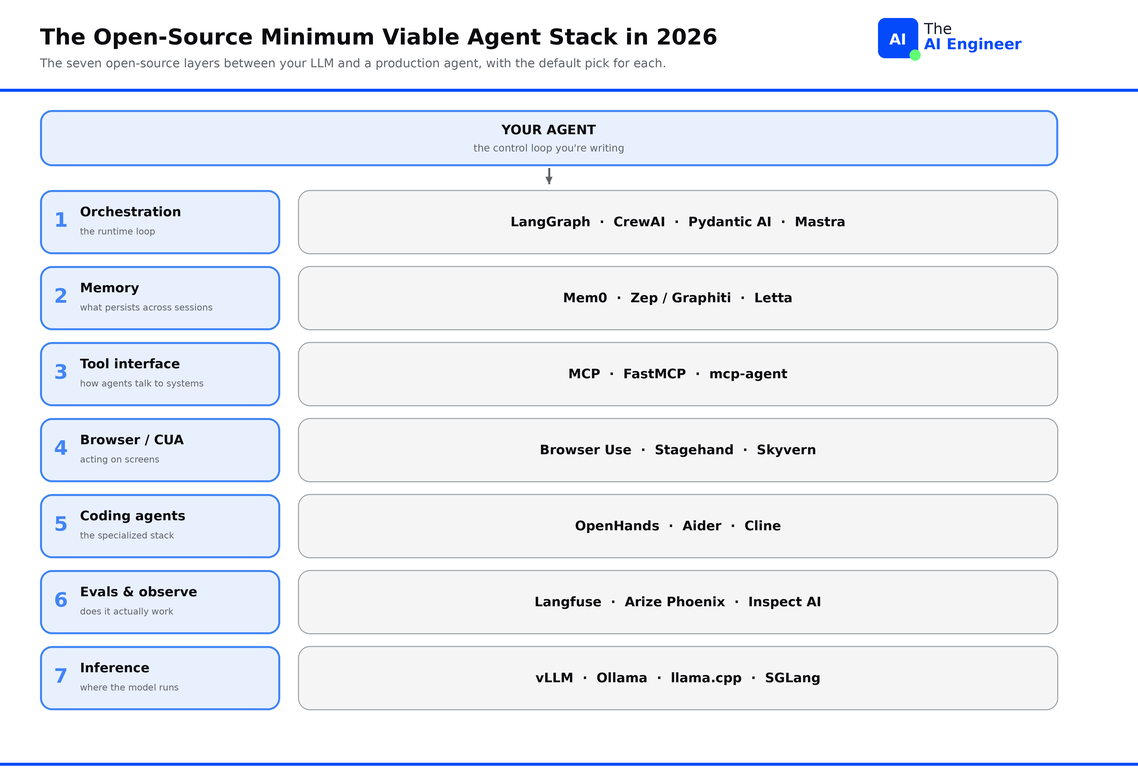
How to pick at each layer
When choosing tools at each layer, ask three questions:
What’s the dominant constraint? Four constraints decide most layer picks. Latency budget is how many tokens or milliseconds you can spend per turn. Audit trail is whether every action has to be traceable for compliance. Model portability is how tied your stack gets to one provider. Language stack is whether your team is Python, TypeScript, or both. One of these usually dominates at each layer.
What’s the rip-out cost if you’re wrong? Swapping an MCP server changes one config line. Swapping orchestration rewrites your state schemas, your nodes, and your edges. The bigger the rewrite, the more you should pick by constraint first.
Is it open-source or open-core? Open-core means the project ships under an open-source license, but production features (multi-tenant auth, replication, SSO, audit logs) only run in the managed cloud product. The repo’s feature list tells you which side of the line you’re buying.
Layer 1: Orchestration & Runtime Control
The orchestration layer runs the agent’s reasoning cycle. The LLM picks an action, the runtime executes it, the runtime observes the result, the LLM picks again. If you skip a framework here, you write the loop yourself, which means reinventing retries, checkpointing, and human-in-the-loop gating before you ship.
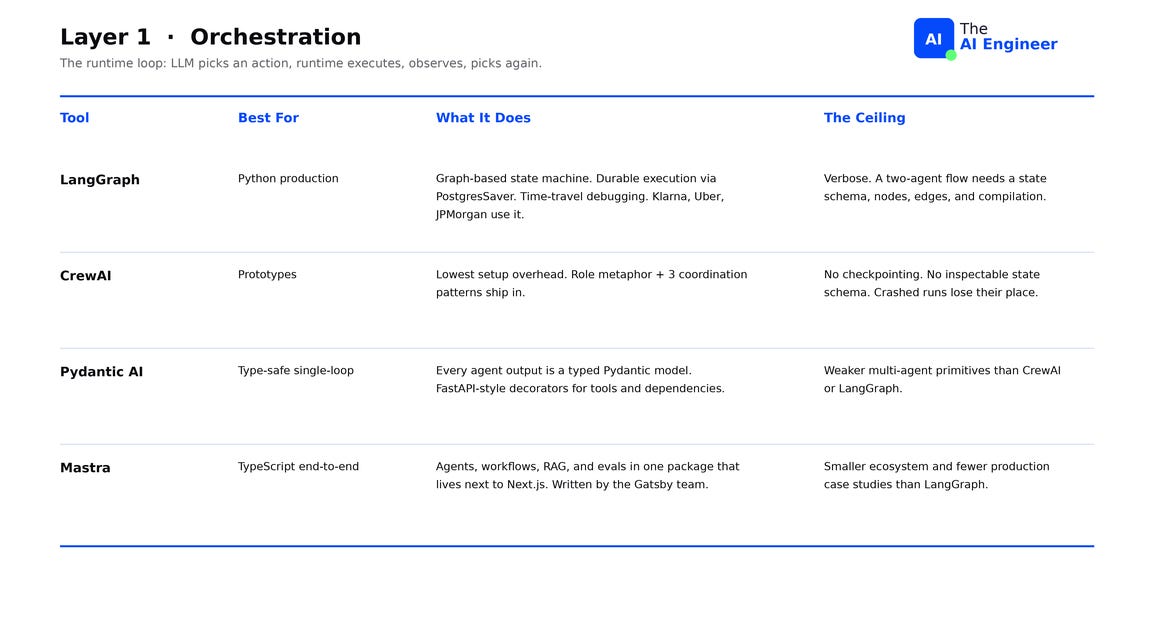
LangGraph is the default for Python production work. Graph-based state machine, durable execution via PostgresSaver, time-travel debugging, and the largest verified enterprise list in the field (Klarna, Uber, LinkedIn, JPMorgan, Replit). Graph state maps onto what regulated industries need: every state transition is an audit log entry, and any failed run rolls back to a prior node and replays from there. The ceiling: it is verbose. A two-agent flow still needs a state schema, nodes, edges, and compilation. For “call three tools sequentially,” it is overkill.
CrewAI has the lowest setup overhead of the four orchestration frameworks. You declare roles like researcher, writer, and reviewer, pick a coordination pattern, and run the crew with no state schema to define first. The ceiling: CrewAI optimizes for prototype velocity at the cost of production durability. The framework can’t resume crashed runs from where they failed, error handling lives at the crew level rather than per-node, and no inspectable state schema records what the agents decided and when. Teams move from CrewAI to LangGraph when production state management starts mattering more than the role metaphor.
Pydantic AI treats every agent output as a typed Pydantic model, so validation, retries, and downstream serialization come for free. FastAPI-style decorators for tools and dependencies. The ceiling: weaker multi-agent primitives than CrewAI or LangGraph. Best fit when the agent is a single loop that has to return validated data to a downstream service.
Mastra is the TypeScript answer. Agents, workflows, RAG, and evals in one package, built by the ex-Gatsby founders, designed to drop into existing Next.js apps without a Python sidecar. The ceiling: smaller ecosystem and fewer production case studies than LangGraph. Choose Mastra when the team is already on TypeScript end-to-end and rewriting in Python isn’t on the table1.
The vendor SDKs (Claude Agent SDK, OpenAI Agents SDK, Google ADK) belong here too. Each one removes orchestration friction and locks the agent to one provider’s API. Pick one if you’re already committed to that provider and not planning to swap models.
Layer 2: Memory & State
The context window is not memory. Even at 200K tokens, every turn pays for the entire conversation again, and nothing survives the session. Production agents in 2026 keep memory in a dedicated layer that lives outside the prompt2.
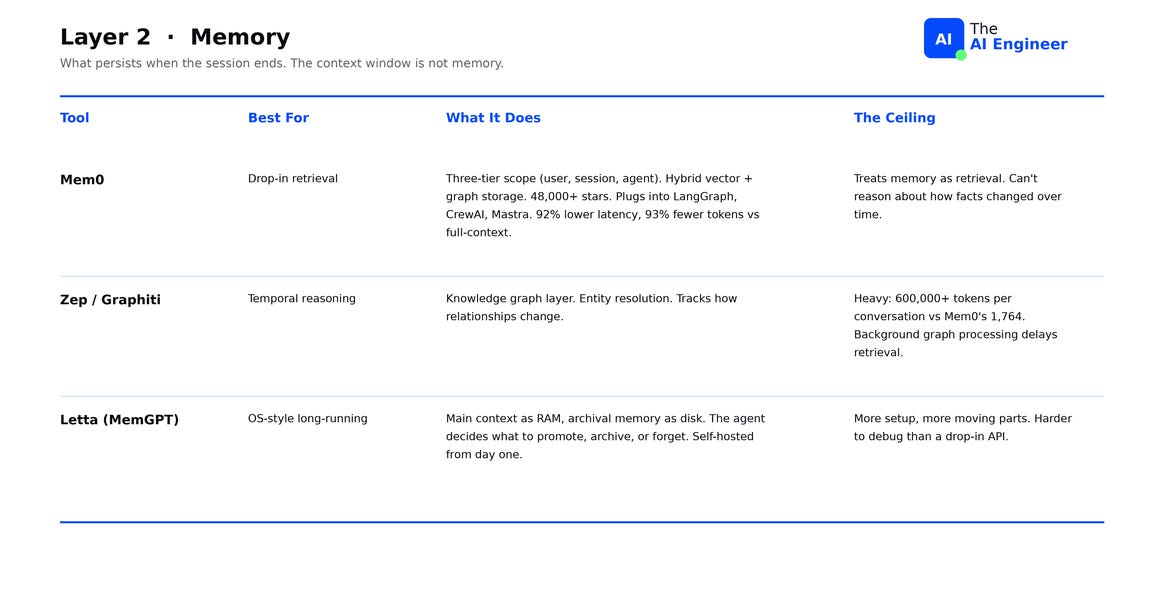
Mem0 Memory can be scoped to a user (persists across all their sessions), a session (just this conversation), or an agent (shared across all users of one agent). Hybrid storage combines vectors and a graph, with mature SDKs that plug into LangGraph, CrewAI, and Mastra. 48,000+ GitHub stars. The ECAI 2025 paper benchmarked Mem0 against ten alternatives on LoCoMo and reported 92% lower latency and 93% fewer tokens versus naive full-context (the baseline every team replaces by week two), which translates to roughly 14x cheaper inference at the same recall3. The ceiling: Mem0 treats memory as retrieval, returning the most similar facts to a query. Temporal reasoning, like “what did the user say last week that contradicts what they said today,” needs a graph that tracks edges between facts with timestamps4.
Zep / Graphiti is the temporal graph option. The knowledge graph layer handles entity resolution: figuring out that “Alice”, “alice@acme.com“, and “the CEO” all refer to the same person. It also tracks how relationships change over time, so the agent can answer “what did this customer’s status look like in Q2?” or “when did the contract owner switch?” The tradeoff: graph construction is expensive. Zep’s memory footprint per conversation runs past 600,000 tokens versus Mem0’s 1,764, and immediate post-ingestion retrieval often fails because correct answers only appear after background graph processing completes. Choose Zep when the agent needs to reason about history and you can wait seconds, not milliseconds, between turns.
Letta (formerly MemGPT) treats memory like an operating system. Main context is RAM, archival memory is disk, and the agent decides what to promote into RAM, archive to disk, or forget. Fully open-source, model-agnostic, self-hosted from day one. The architecture extends an agent’s effective context far beyond the LLM’s native window by paging memory in and out, the same trick operating systems use to give programs more virtual memory than physical RAM. The ceiling: you run the storage layer yourself. Letta is harder to deploy than calling a hosted Mem0 endpoint, and harder to debug because memory decisions happen inside the agent at runtime5.
🏗️ Engineering Lesson. “Memory” means two different things in an agent system, and using one tool for both breaks both. Runtime state is the agent’s scratchpad mid-task: which node it’s at, what tools it called, what intermediate results it has. LangGraph’s PostgresSaver writes this after every step, so a crashed run resumes from the last node. Knowledge memory is what the agent learned across sessions: preferences, prior questions, facts about the user. Mem0 and Zep store this. Conflate them and you get an agent that resumes a crashed run correctly but forgets the user the moment they open a new session, or one that remembers the user but can’t recover when it crashes mid-task.
Layer 3: Protocols & Tools
Two years ago this layer was function calling: each provider had its own JSON schema, each framework wrapped them differently, switching models meant rewriting your tools.
In 2026 this layer is MCP. The Model Context Protocol is the open standard the Claude Agent SDK uses, that OpenAI Agents SDK supports natively, that Google ADK integrates with, that every serious framework now ships a client for. If you are writing tools today, you are writing MCP servers. If MCP itself is fuzzy, What is MCP? is the prerequisite.
There’s no framework to pick at this layer. The orchestration choice from layer 1 already decided how MCP integrates.
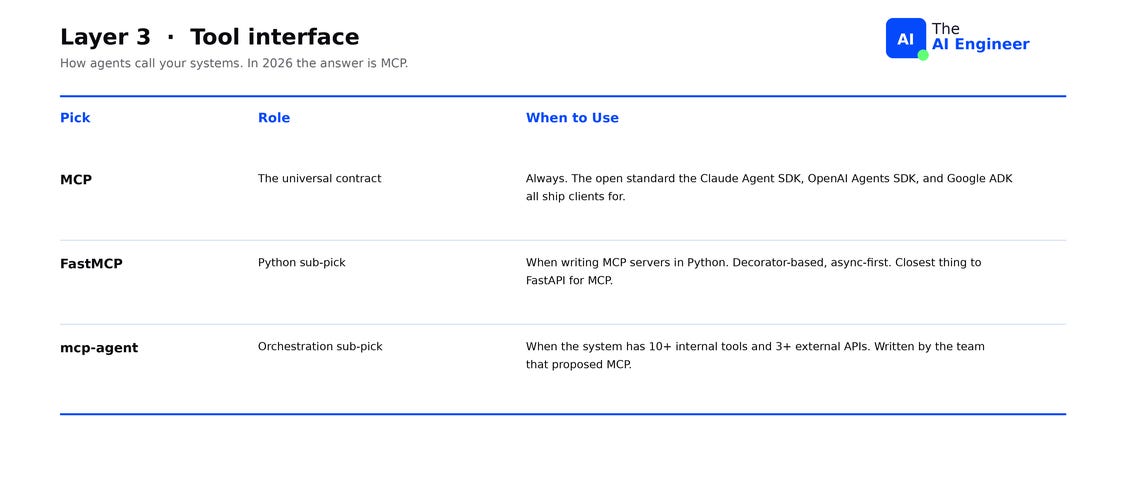
FastMCP is the Python framework for writing MCP servers fast. Decorator-based, async-first, the closest thing to FastAPI for MCP. mcp-agent is an orchestration framework built around MCP as the primary tool interface. Server lifecycle, multi-server routing, and prompt context handling are built in. With LangGraph or CrewAI, you write that integration code yourself. Worth looking at when your agent connects to several MCP servers and the integration code starts becoming the bottleneck.
Layer 4: Browsers & Computer Use
When the system the agent has to act on does not expose an API, the toolkit has to act through screens. The 2026 field split into two architectural approaches: DOM-driven (parse the page, find elements, click them) and vision-driven (screenshot the page, feed it to a vision model, click pixels).
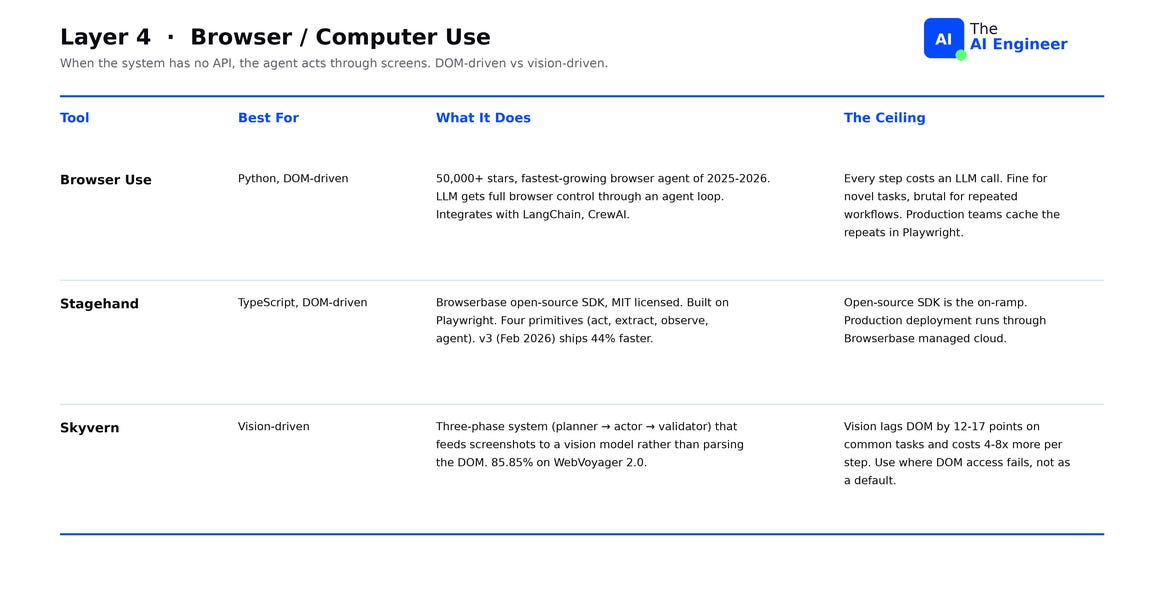
Browser Use is the Python default. 50,000+ GitHub stars, one of the fastest-growing open-source AI projects of 2025-2026. The LLM gets full control of the browser through an agent loop and integrates with LangChain, CrewAI, and custom frameworks. The ceiling: every step costs an LLM call, which is fine for novel tasks and brutal for repeated workflows. Production teams cache the repeated 80% in Playwright (the deterministic browser automation library) and leave Browser Use for the 20% that needs reasoning.
Stagehand is the TypeScript answer. Open-source SDK from Browserbase, MIT-licensed, built as a layer on top of Playwright. Four primitives let the developer keep AI inference for the steps that need reasoning and use scripted Playwright code for the rest. Stagehand v3 (February 2026) rewrote the engine on top of Chrome DevTools Protocol and ships 44% faster6. The ceiling: production deployment runs through Browserbase’s managed cloud. The open-source SDK is the on-ramp7.
Skyvern is the vision-first option. Each task runs through a three-phase pipeline: planner breaks the goal into steps, actor sends a screenshot to a vision model and clicks the coordinates it returns, validator confirms the page changed. Skyvern scores 85.85% on WebVoyager 2.0, the strongest published score on form-filling tasks in domains where the DOM is unreliable: canvas elements, React virtual DOMs nested in iframes, or anti-bot machinery. That score still translates to roughly one in seven multi-step tasks failing. The ceiling: vision-driven stacks lag DOM-driven ones by 12-17 points on common tasks and cost 4-8x more per step8.
The production pattern in 2026 wires both in: DOM-driven as the primary path, Skyvern or Anthropic Computer Use or OpenAI CUA as the escape hatch when selectors keep failing on canvas elements or anti-bot screens. Edge surfaces are one of the four agent failure modes, we cover all four in Why AI Agents Keep Failing in Production.
Layer 5: Coding Agents & Sandboxes
Coding agents are a category of their own now. They write code, run it, debug it when it breaks, and read docs to figure out what they got wrong. This layer ships with three things the other six don’t: a sandboxed file system to write and edit code without escaping into the host, terminal access to run builds, tests, and linters, and a browser tool because half the work involves reading docs. The category also has its own benchmark, SWE-bench Verified, a curated set of real GitHub issues an agent must resolve into a working PR. For the closed-source comparison, see Cursor vs Claude Code.
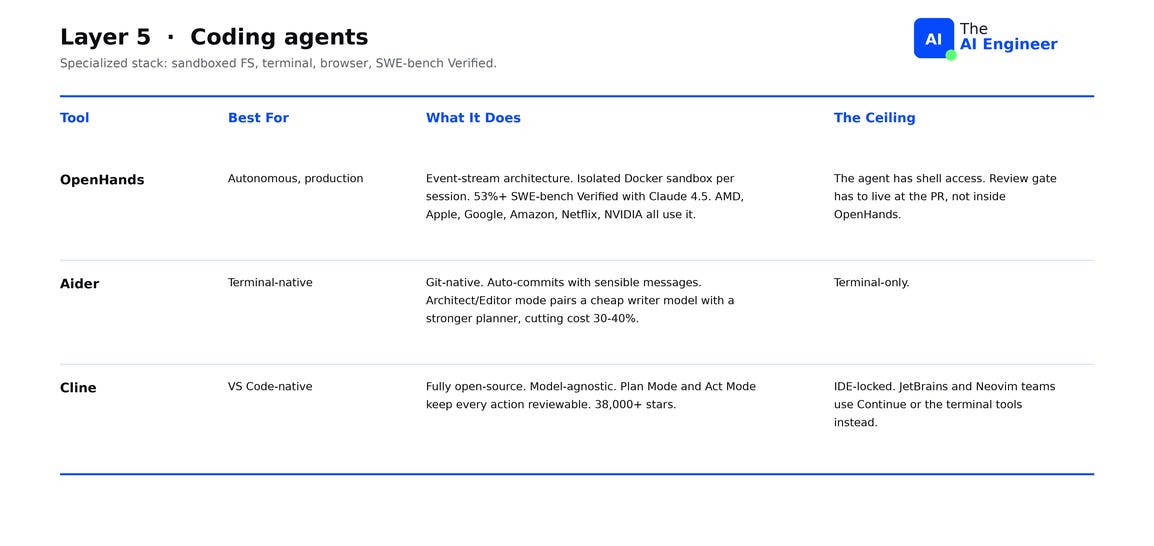
OpenHands (formerly OpenDevin) is the production-grade autonomous option. 72,000+ GitHub stars, $18.8M Series A, used in production at AMD, Apple, Google, Amazon, Netflix, and NVIDIA. The event-stream architecture moves through four states per loop: agent reasons, agent emits an action, environment executes it, environment returns an observation. Each session runs in an isolated Docker sandbox. The benchmark question for this category is what percentage of real-world bug tickets the agent can resolve end-to-end without human input. OpenHands scores 53%+ on SWE-bench Verified with Claude 4.5, up to 72% with Claude 4 on the published platform results. The ceiling: the agent has shell access. Review can’t live inside OpenHands; it has to live at the PR9.
Aider is the terminal-native option, and the original open-source coding agent. 35,000+ GitHub stars, 13,100+ commits across 93 releases. Git-integrated by design: every change becomes a commit with an auto-generated message that names what it touched, so the entire agent session is in your git history. Architect/Editor mode splits the work between two models: a stronger one plans the edit, a cheaper one writes the code. The split cuts cost 30-40% versus running a top-tier model on every token. Aider scores 32% on SWE-bench Verified with Claude 4.5, well below OpenHands, but it ships fewer surprises because every action lands in git. The ceiling: terminal-only. No IDE integration, no project-wide context beyond what Aider parses from the files you pass it.
Cline is the VS Code-native answer. 38,000+ GitHub stars, fully open-source, model-agnostic, and the only option here with a meaningful market share inside VS Code teams. Plan Mode and Act Mode separate intent from execution: Plan Mode drafts the change list and pauses for approval, Act Mode executes the approved plan. Every action is reviewable before it touches the codebase, which is the design point engineering managers ask about first. Choose Cline when the team lives in VS Code and human review on each step is required by policy. The ceiling: IDE-locked. JetBrains or Neovim teams should look at Continue or the terminal tools above.
Most teams running production coding agents in 2026 run two: one commercial (Claude Code, Codex) for hard tasks, one open-source for flexibility and outages. How Cursor Actually Works shows what the leading commercial coding agent actually does under the hood.
Layer 6: Evals & Observability
The evals & observability layer records what the agent did in production and tests what it can do before shipping. Tracing captures every LLM call, tool invocation, and cost, indexed by user and session, so when an output is wrong you can replay the exact context that produced it. Evals are reproducible test suites the agent runs against fixed inputs with pass/fail criteria scored the same way every time. Production-grade agent teams in 2026 wire both in on day one. Skipping this layer is the most expensive mistake in agent engineering.
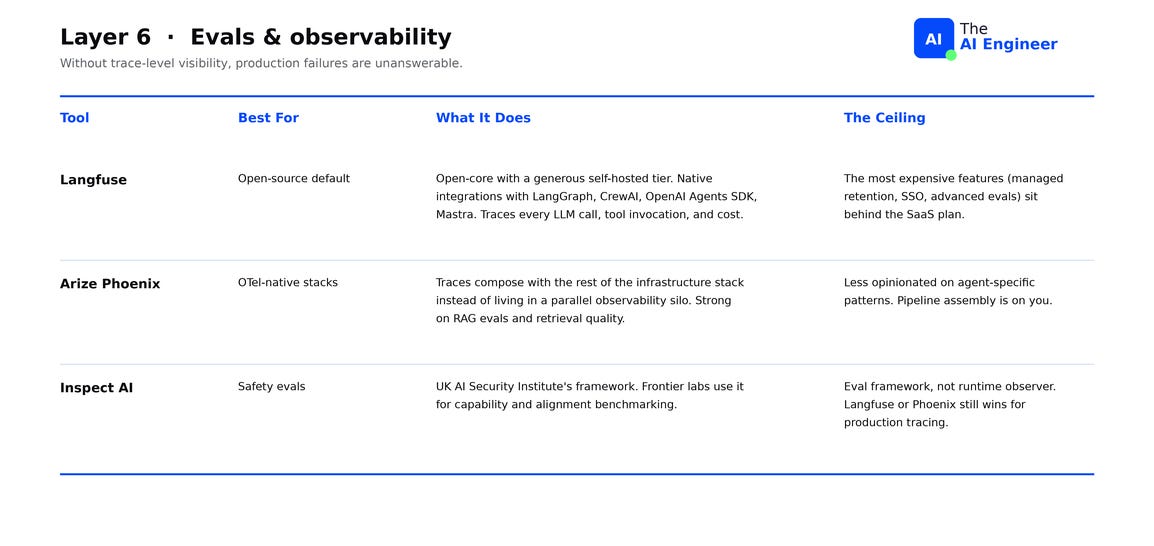
Langfuse is the open-source observability default. Open-core with a generous self-hosted tier and native integrations with LangGraph, CrewAI, OpenAI Agents SDK, and Mastra. Every LLM call, tool invocation, and cost gets traced and indexed. The ceiling: managed retention, SSO, and advanced eval features run on the SaaS plan. The self-hosted version covers tracing and dashboards.
Arize Phoenix is the OpenTelemetry-native alternative. Traces flow into the same Grafana, Datadog, or Honeycomb dashboards the rest of your stack already uses, so agent telemetry sits next to your API and service traces instead of in a separate tool. Strong on RAG evals and retrieval quality. The ceiling: Phoenix doesn’t ship opinionated agent-specific defaults. The pipeline assembly is on you.
Inspect AI is the UK AI Security Institute’s open-source eval framework. The institute wrote it for safety evals: testing whether the agent refuses jailbreaks, leaks PII, or generates unsafe content. Frontier labs now use it for capability and alignment benchmarking too. The ceiling: Inspect is for offline evaluation. If you also need to see what the agent is doing live in production, you'll want Langfuse or Phoenix next to it.
🏗️ Engineering Lesson. Wire tracing in on Day 1, before the first user. Setting up Langfuse or Phoenix at project start is a couple of hours of config work. Without those records, debugging a production failure means guessing which prompt version, which user input, and which tool sequence produced it.
Layer 7: Models & Inference
Every step an agent takes is at least one inference call, often more. The engine running those calls, the software wrapping the GPU, batching requests, managing the KV cache, sets the cost floor for everything else. Hosted API agents inherit their provider’s engine. Self-hosted agents pick their own, and the pick determines what the agent costs to run at scale.
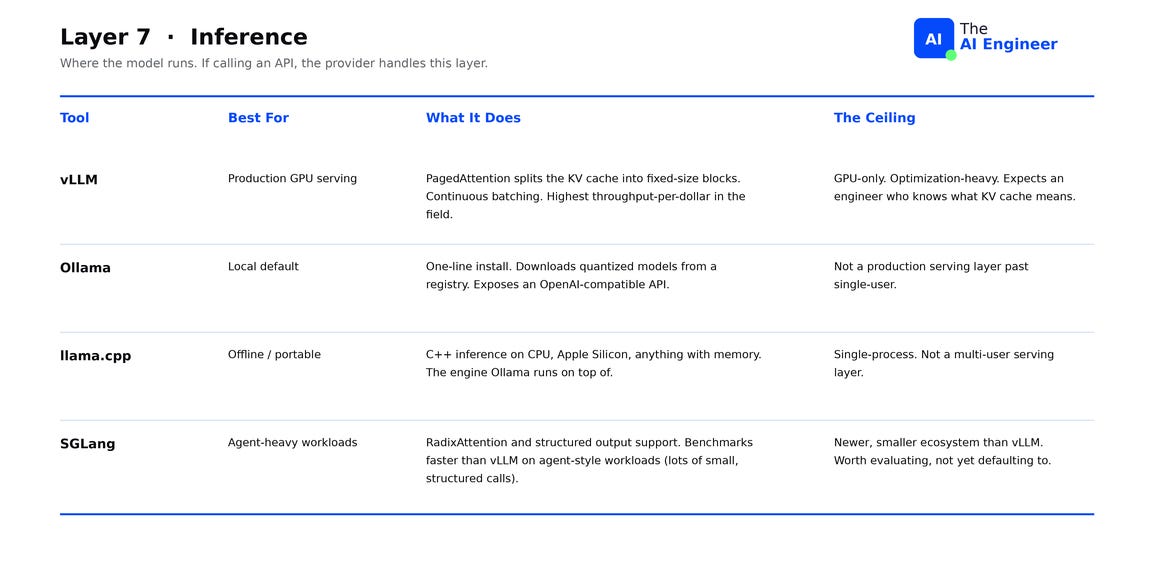
vLLM is the production serving default for open-weight models. Its core innovation is PagedAttention: a memory management trick that splits the KV cache into fixed-size blocks so multiple requests share GPU memory without wasted space. Combined with continuous batching, it produces the highest throughput-per-dollar in the field. The ceiling: vLLM is GPU-only, optimization-heavy, and assumes the operator knows what KV cache means.
Ollama is the local default. One-line install, downloads quantized models from a registry, and exposes an OpenAI-compatible API. Quantization compresses weights from 16 bits down to 4 or 8, trading a small accuracy hit for fitting in laptop RAM. The ceiling: Ollama isn’t a production serving layer past a single user.
llama.cpp is the engine Ollama runs on top of. Pure C++ with no GPU dependency, it runs LLMs on CPU, Apple Silicon, Raspberry Pi, and anything with enough RAM. The project also defined GGUF, the file format used to ship quantized open-weight models, so the same model file runs across every llama.cpp-based tool unchanged. The ceiling: CPU throughput sits well below GPU serving, which makes llama.cpp the right pick for local and offline workloads only.
SGLang is the newer challenger. Two design choices set it apart. First, when many requests share an opening prompt, SGLang caches the computation of that prefix once and reuses it, instead of recomputing it for every call. Second, when the agent needs JSON output, SGLang enforces the schema inside the inference engine itself, so the model can’t generate invalid JSON in the first place. On agent workloads, SGLang benchmarks faster than vLLM. The ceiling: smaller community, fewer integrations, less battle-tested than vLLM in production at scale.
What Does NVIDIA Actually Do? breaks down the hardware layer every engine in this section ultimately runs on.
The seven layers don’t compose
The instinct when reading a seven-layer diagram is to assume the layers compose vertically: pick layer 1, that constrains layer 2, which constrains layer 3, and the right toolkit is the one where every box fits together.
Most agent rewrites in 2026 trace back to a team that built on that assumption.No ecosystem is best-in-class at all seven layers, and the integrations between layers were never designed to compose. They meet at thin seams: a config file, an import, an HTTP call.
The seven layers are seven independent decisions. Each one has a dominant constraint that picks the winner. Four constraints decide most picks: latency budget, audit trail, model portability, and language stack.
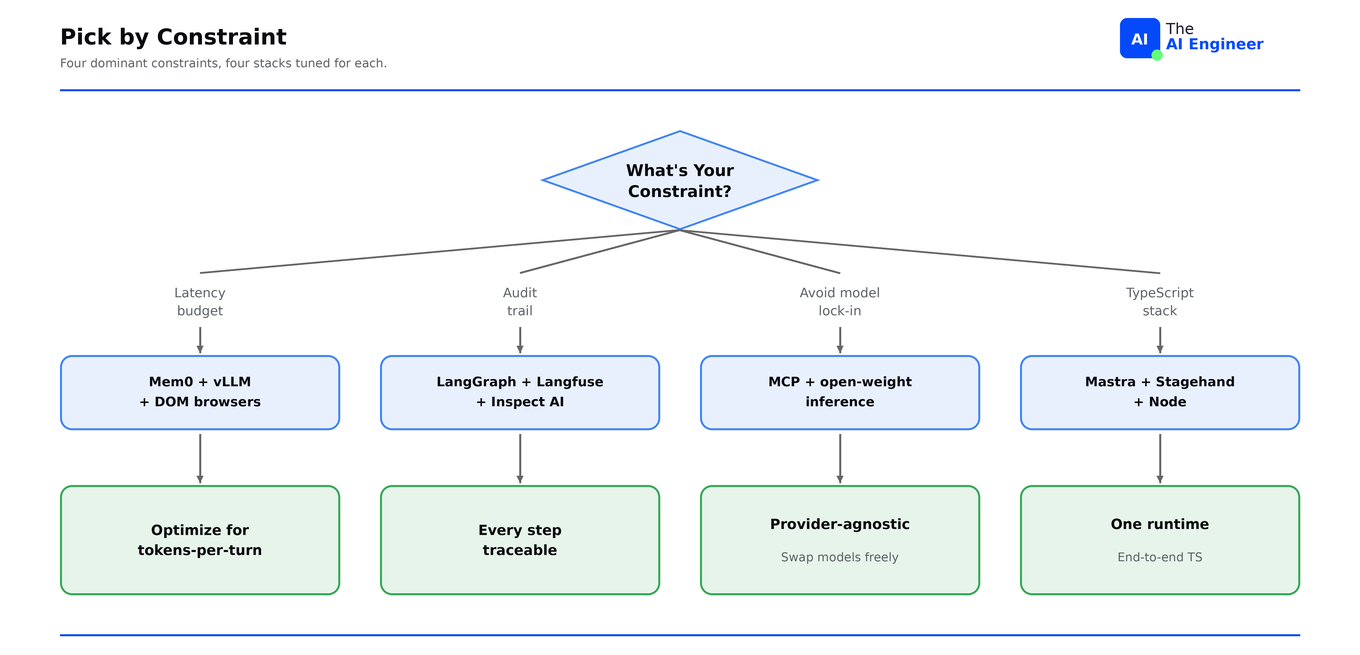
The four constraints rarely point at the same winner. Latency-first stacks pull toward Mem0 and vLLM. Audit-first stacks pull toward LangGraph and Langfuse. Model portability pulls away from vendor SDKs. Language stack pulls toward Mastra or Pydantic AI. Trying to satisfy all four with one ecosystem means picking the average tool at every layer instead of the best one at each.
The reframe: an agent’s toolkit is seven small bets, each with a single dominant constraint, and each made independently. The teams shipping reliable agents in 2026 are the ones who picked the best tool per layer and accepted that integrating the seams is part of the job.
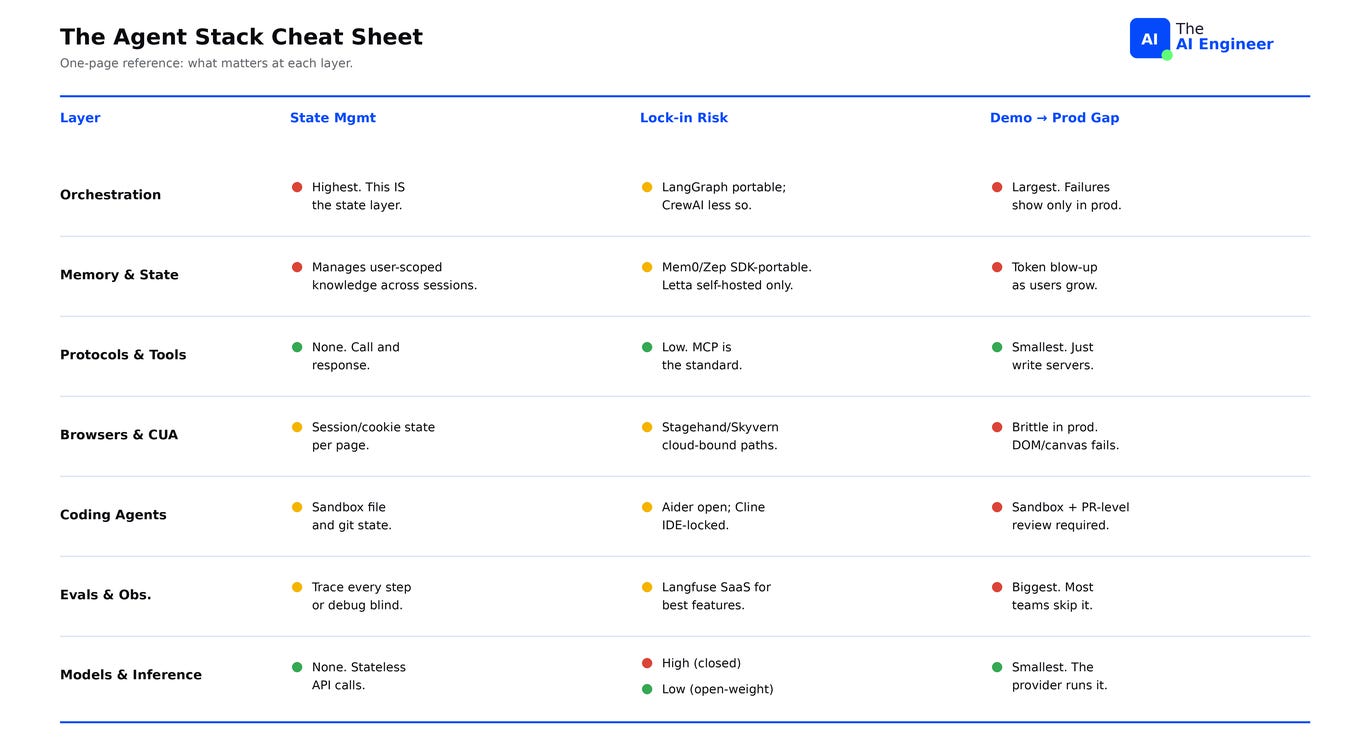
The Agent Stack Cheat Sheet
Before swapping any layer in a production agent, check this table first. The state column tells you how much you have to migrate. The lock-in column tells you what you’re giving up if you switch. The demo-to-prod column tells you how long the swap will actually take.
Curious: what layer did you get wrong on your last agent project, and what did it cost you? The most common answer becomes Friday’s issue.
Where to next?
🔗 Go simpler: What is an AI Agent? Start at zero before picking from the toolkit.
📖 Go deeper: The AI Agents Stack (2026 Edition). The same map, but with the closed-source pieces and full architectural view.
🔀 Go adjacent: Why AI Agents Keep Failing in Production. Even the right toolkit doesn’t save you from the four most common failure modes.
Want to break into AI engineering? How to Break Into AI Engineering in 2026 is the full roadmap on getting there.
🔜 Friday: H100 vs H200 vs Blackwell. What you pay per token on each, and when the upgrade math works.