

What is MCP?
The USB-C of AI models.

You built a Slack integration for your AI assistant. It took a week: OAuth flow, message parsing, error handling, rate limits. It works. Your team loves it.
Then the CTO asks: “Can we plug this into ChatGPT too?” Different SDK. Different auth model. Different tool schema. Another week. Then someone wants it in Cursor. Then Gemini. Four tools, four custom integrations, four things to maintain. You’ve written the same Slack connector four times.
That’s the N×M problem. N tools times M AI models equals a combinatorial mess that scales exactly as badly as it sounds. And every AI team building production systems has hit it.
MCP is the fix. I rewrote my Slack connector as an MCP server in an afternoon. Both models picked it up immediately. Here’s how it works and why every major AI company adopted it within twelve months.
TL;DR
MCP (Model Context Protocol) is an open standard that gives AI models a universal way to connect to external tools and data. One MCP server, every AI model. Think USB-C for AI.
It solves the integration explosion. Instead of building custom connectors for every model-tool combination, you build one MCP server per tool and every model that speaks MCP can use it.
The architecture is three roles: a Host (your AI app), a Client (manages connections), and a Server (exposes the tool). Communication happens over JSON-RPC.
Let’s get into it.
Before MCP, There Was Function Calling
To understand why MCP matters, you need to understand the thing it replaced.
Function calling (also called tool use) is the mechanism that lets an LLM do more than generate text. You define a function, describe its parameters in a JSON schema, and the model decides when to call it. “What’s the weather in Tokyo?” triggers a weather API call. “Book me a flight” triggers a booking function. We covered how this powers the think-act-observe loop in our AI Agents explainer. 🔴🔴🔴
Function calling works. It’s the reason AI assistants can actually do things instead of just talking about doing things. But it has a structural problem.
Every AI provider implements function calling differently. OpenAI has its tool_choice parameter and parallel function calling. Anthropic has its own tool use format with different content block types. Google has yet another schema. If you build a weather tool for the OpenAI API, it doesn’t work with Claude. If you build it for Claude, it doesn’t work with Gemini. The function is identical. The wiring is completely different.
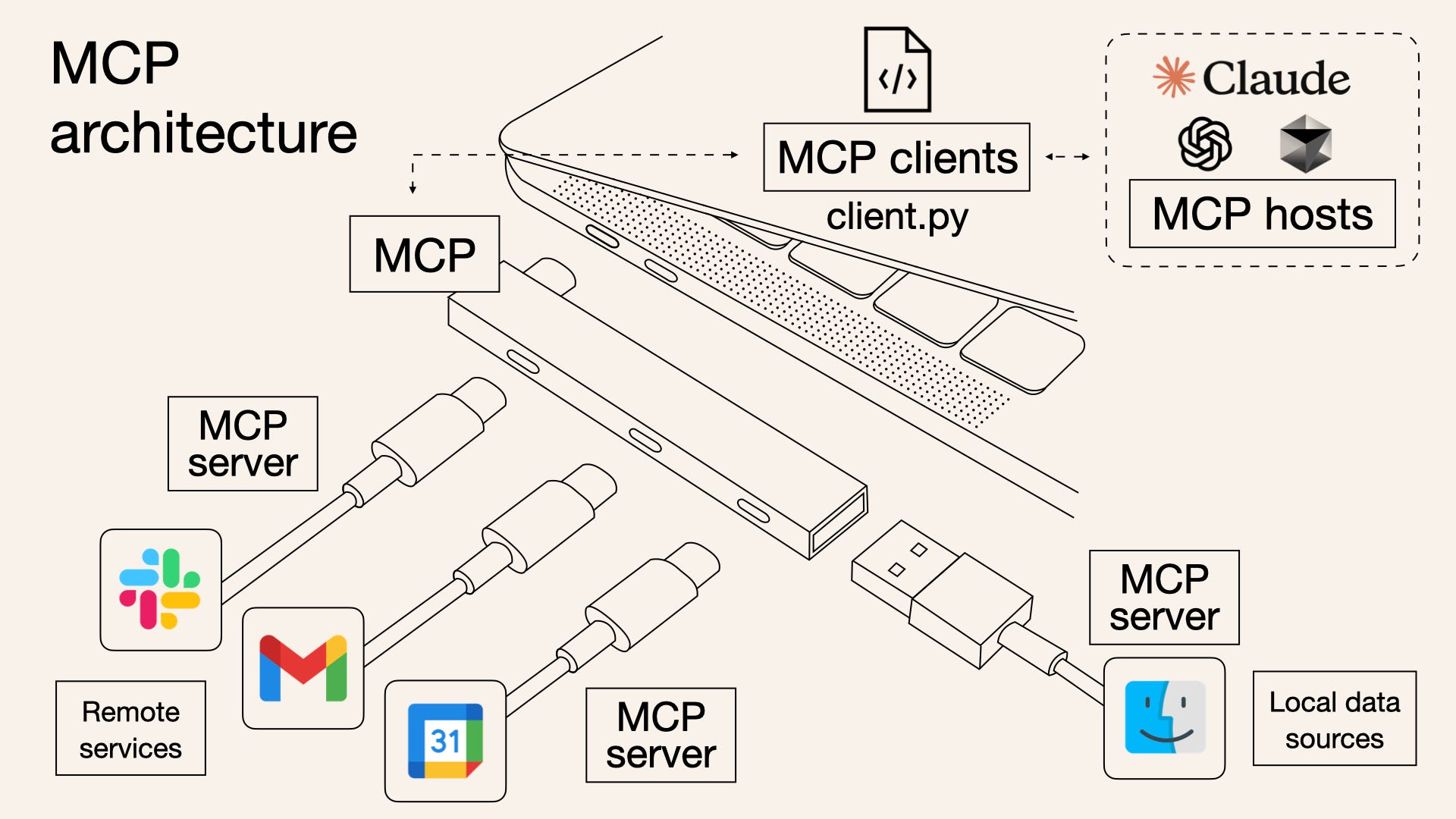
This is the pre-USB-C world. Your phone charger doesn’t fit your laptop. Your laptop charger doesn’t fit your tablet. Every device, every cable.
Why Function Calling Breaks Down
Let’s make this concrete with numbers.
Say your company uses 5 internal tools (Slack, GitHub, Jira, your internal docs, a production database) and you want them accessible to 3 AI models (Claude, GPT, Gemini). That’s 15 custom integrations. Each one needs its own auth handling, schema translation, and error management. Each one breaks independently when either the tool or the model updates its API.
Now scale to a real enterprise. 20 tools. 4 models. 80 integrations. Maintained by a team that would rather be building product features.
The problems stack up:
Duplication. The logic for “search Jira tickets” is the same regardless of which model calls it. But you’re writing it three times because each model expects a different wrapper.
Fragility. When Jira updates its API, you fix one integration. Then the other two. Then you find out the third broke silently two weeks ago and nobody noticed because that model only gets used on Fridays.
No discoverability. Each integration is a bespoke JSON schema hardcoded into your application. There’s no way for a model to browse available tools, read their documentation, or understand what’s possible without you manually listing every function in the system prompt.
No state. Function calling is fire-and-forget. The model calls a function, gets a response, and has no persistent relationship with the tool. For simple lookups that’s fine. For multi-step workflows (”find the bug in Jira, pull the related PR from GitHub, check if the fix is deployed”), you’re stitching stateless calls together yourself.
⚠️ Confusion Alert: MCP doesn’t replace function calling. It standardizes it. Your LLM still uses tool calling under the hood. MCP just means you define each tool once and every model can call it the same way. Think of function calling as the electrical standard (110V vs 220V) and MCP as the plug shape (USB-C). MCP makes the plug universal.
🏗️ Engineering Lesson: Not everything needs MCP. If your application uses one model and three tools, function calling works fine. MCP adds architectural complexity, a server to run, a connection to manage, a security surface to audit. The N×M problem only hurts when N and M are both greater than one and growing. For a single internal tool that only talks to one model, MCP is overengineering. Just use function calling directly.
How MCP Actually Works
MCP exists because of all those problems. One protocol, one integration per tool, every model.
The architecture has three roles, and the USB-C analogy maps directly:
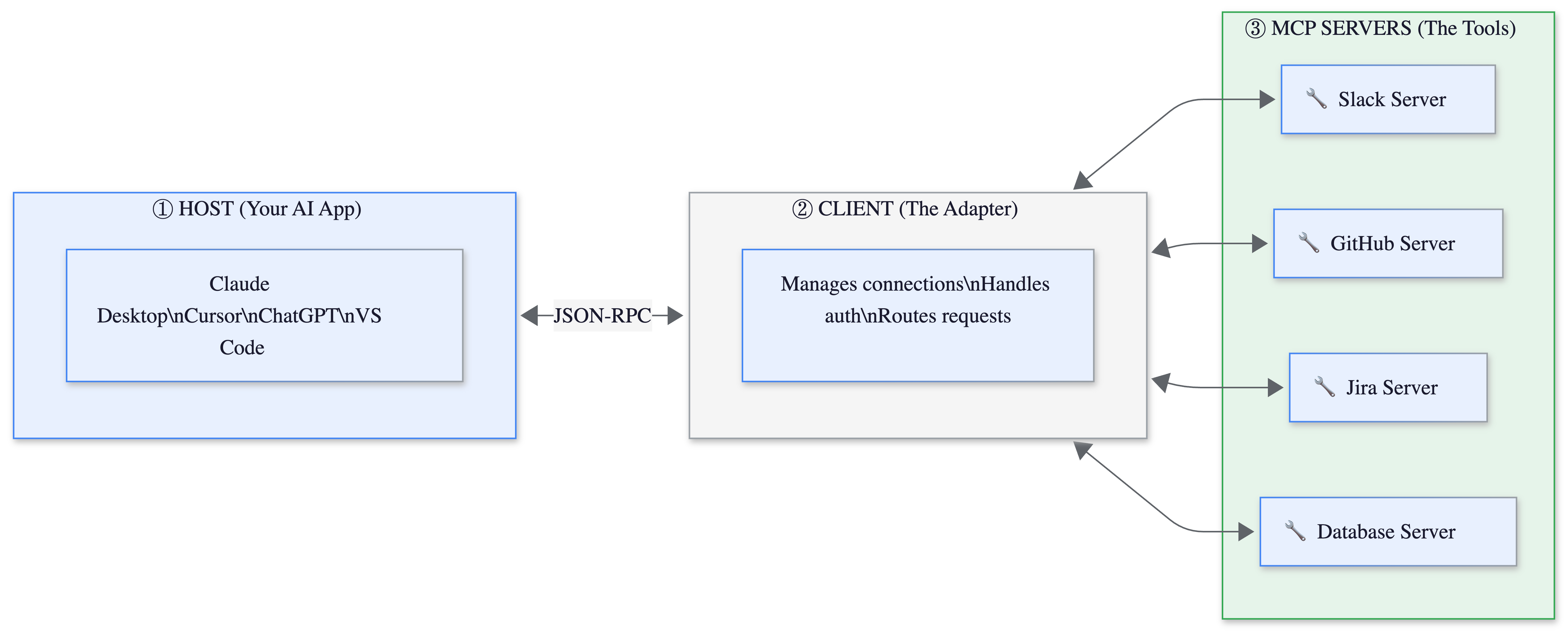
The Host is your AI application. Claude Desktop, Cursor, ChatGPT, VS Code with Copilot. In the USB-C analogy, this is your laptop. It’s the thing that needs to connect to stuff.
The Client lives inside the host and manages MCP connections. It handles authentication, routes requests to the right server, and manages the session lifecycle. This is the USB-C port. One port, many cables.
The Server exposes a specific tool or data source through three primitives:
Tools: Actions the model can take. “Send a Slack message.” “Create a Jira ticket.” “Query the database.”
Resources: Data the model can read. “The contents of this file.” “The latest 50 messages in #engineering.” “The schema of this database.”
Prompts: Reusable templates that combine tools and resources for common workflows. “Summarize today’s Slack activity and create a standup report.”
The protocol itself uses JSON-RPC 2.0. If you’ve worked with the Language Server Protocol (the thing that powers autocomplete in VS Code for every programming language), MCP is directly inspired by it. Same idea: one protocol that standardizes how a class of applications connects to a class of tools.
Here’s what a minimal MCP server looks like in Python:
from mcp.server import Server
import mcp.types as types

server = Server("weather")

@server.list_tools()
async def list_tools():
    return [types.Tool(
        name="get_weather",
        description="Get current weather for a city",
        inputSchema={
            "type": "object",
            "properties": {
                "city": {"type": "string"}
            },
            "required": ["city"]
        }
    )]

@server.call_tool()
async def call_tool(name: str, arguments: dict):
    if name == "get_weather":
        # Your actual weather API call here
        return f"Weather in {arguments['city']}: 72°F, sunny"
That’s it. This server works with Claude, ChatGPT, Cursor, Gemini, and any future model that speaks MCP. You wrote it once.
📔 Deeper Look: The MCP spec drew heavily from the Language Server Protocol (LSP), which solved the same N×M problem for programming language support in editors. Before LSP, every editor needed a custom plugin for every language. After LSP, language servers work everywhere. MCP is applying the same pattern to AI-tool integration. The official spec is worth reading if you’re building servers1.
Who’s Using It (Everyone)
MCP is no longer Anthropic’s protocol. It’s the industry’s. Within twelve months of launch, OpenAI, Google, and Microsoft all adopted it. In December 2025, Anthropic donated MCP to the Linux Foundation’s Agentic AI Foundation, co-founded with OpenAI and Block2. As of early 2026: 97 million monthly SDK downloads, tens of thousands of community-built servers, and native support in ChatGPT, Claude, Cursor, Gemini, Copilot, and VS Code. The New Stack called it one of the fastest protocol adoptions in tech history3.
What Can Go Wrong (and What’s Overhyped)
MCP’s adoption curve has been remarkable. The security story has been less so.
Tool poisoning is real and alarming. Attackers can embed hidden instructions in MCP tool metadata, invisible to users but processed by AI models. In controlled testing, tool poisoning attacks achieved 84% success rates when agents had auto-approval enabled4. The attack doesn’t even require calling the poisoned tool. Just loading it into context is enough for the model to follow its hidden instructions. OWASP published an MCP-specific Top 10 to address this.
The ecosystem is immature. 43% of public MCP servers contain command injection flaws. A critical OAuth vulnerability (CVE-2025-6514) in the popular mcp-remote package affected over 558,000 installs before being patched. The community has built tens of thousands of servers, but the quality varies wildly. Treat MCP servers like browser extensions: install only what you need, from trusted sources, and audit regularly.
Context window costs are hidden. Every MCP server you connect adds its tool definitions to the model’s context window. Connect 10 servers with 5 tools each, and you’ve burned 50 tool descriptions worth of tokens before the user says a word. Cursor limits you to 30 tools for exactly this reason. Cloudflare’s “Code Mode” approach, where agents discover tools on demand instead of loading all definitions upfront, reports 98%+ token savings but adds latency. I learned this the hard way: after connecting my fifth MCP server, Claude stopped calling the first two entirely. They were still listed, still connected. But 30+ tool definitions meant the model couldn’t rank which tool to use. The fix was removing three servers I rarely used. Fewer tools, better tool selection.
💡 My Take: MCP is genuinely important infrastructure. The protocol solved a real problem and the adoption proves it. But the “USB-C for AI” framing, while catchy, understates the security gap. USB-C doesn’t let your phone charger read your laptop’s filesystem. MCP servers can and do have that kind of access. The convenience-to-risk ratio is still being negotiated.
The One Thing to Remember
MCP doesn’t make AI models smarter. It doesn’t improve reasoning or reduce hallucinations. What it does is make the next integration free. The first MCP server costs you an afternoon. The second one costs you an hour. The tenth one costs you nothing, because every model already speaks the protocol. That’s the real shift: not better AI, but AI that plugs in.
Where to Next?
📖 Go Deeper: How Cursor Actually Works: the architecture behind the editor that uses MCP servers to code for you.
🔗 Go Simpler: What is an AI Agent?: the think-act-observe loop that MCP plugs into.
🔀 Go Adjacent: Cursor vs Claude Code: both tools use MCP servers. Here’s how they compare on everything else.
Are you using MCP servers in production?
Which ones actually work, and which ones did you uninstall within a day?
The MCP specification (version 2025-11-25) defines the full protocol: JSON-RPC transport, three primitives (Tools, Resources, Prompts), capability negotiation, and security considerations. Maintained at modelcontextprotocol.io.
Anthropic’s announcement of donating MCP to the Linux Foundation’s Agentic AI Foundation. Co-founded by Anthropic, OpenAI, and Block, with AWS, Google, Microsoft, Cloudflare, and Bloomberg as supporting members. Full announcement.
The New Stack analyzed MCP's adoption velocity against comparable standards. OpenAPI (Swagger), OAuth 2.0, and HTML/HTTP each took significantly longer to reach cross-vendor support. Full analysis.
Security data from multiple sources: Invariant Labs’ MCPTox benchmark, OWASP MCP Top 10 (beta), and Composio’s vulnerability analysis of public MCP servers. Tool poisoning success rates refer to controlled testing with auto-approval enabled, not production deployments.