


The Pain
You built a customer support chatbot. It knows your entire product catalog, your return policy, your shipping tiers. A customer asks: “Is the blue hoodie in stock in size L?” The chatbot responds with a beautifully written paragraph about your inventory management practices. It cannot check the actual inventory.
Your LLM can talk about doing things. It cannot do things. That gap is function calling.
TL;DR
Function calling is the difference between an LLM that talks about doing things and one that actually does them. The LLM reads your request, outputs a structured JSON call with the function name and arguments, and your code executes it. The LLM never touches your APIs directly.
Every major provider supports it. OpenAI calls it “function calling,” Anthropic calls it “tool use,” Google calls it “function calling.” Different names, same mechanism. As of 2026, it’s a standard capability, not an experimental feature.
It’s provider specific. MCP is the fix. Each provider formats tool definitions differently. If you switch models, you rewrite your schemas. MCP standardizes how tools are discovered and shared across models and applications.
The mechanism is simple. The production system around it is not. Tool definitions eat your context window (58 tools consume ~55,000 tokens), argument extraction breaks on ambiguous input, and error handling is entirely your problem.
Let’s get into it.
Before Function Calling: Hardcoded If/Else Routing
Before LLMs could choose which function to call, developers wrote the routing logic themselves.
The pattern looked like this: parse the user’s message with keyword matching or intent classification, map it to a predefined action, execute that action, return the result. If the user said anything containing “cancel” and “order,” route to the cancellation handler. If they mentioned “track” and “shipping,” route to the tracking lookup.
# The old way: you decide what to call
if "cancel" in user_message and "order" in user_message:
    result = cancel_order(extract_order_id(user_message))
elif "track" in user_message:
    result = track_shipment(extract_order_id(user_message))
elif "stock" in user_message:
    result = check_inventory(extract_product(user_message))
else:
    result = "I'm not sure what you're asking."
This is the simple ancestor. It works. Plenty of production chatbots still run on this pattern. But it has a ceiling.
🔗 Prerequisite: We covered the think-act-observe loop that powers AI agents in What is an AI Agent?. Function calling is specifically the “act” mechanism.
Why Hardcoded Routing Breaks Down
Go back to our customer support chatbot. A customer writes: “Hey, I ordered the blue hoodie last Tuesday but I got the red one instead, and I need the blue one by Friday for a birthday. Can you swap it and upgrade my shipping?”
That single message needs three operations: look up the order, initiate an exchange, and upgrade shipping. Your if/else tree handles one intent per message. It has no idea what to do with three.
The problems stack up fast:
Ambiguity kills routing rules. “I want to return this” could mean product return, refund, or exchange. Keyword matching can’t disambiguate. You end up writing increasingly brittle regex patterns and confidence thresholds.
Multi-step requests are invisible. Real user messages contain two, three, four intents. Hardcoded routing forces you to handle them one at a time, if at all.
New tools require new code. Every time you add a capability (loyalty points lookup, warranty check, store locator), you write another branch. At 30 tools, the routing logic is unmaintainable.
Parameter extraction is fragile. Pulling “order #4821” out of “yeah so my order number is like 4821 or something” requires its own NLP pipeline per tool. You’re building two systems: one to understand the user, one to route the request.
The fundamental problem: you’re using human-written rules to bridge natural language and structured APIs. That bridge doesn’t scale.
How Function Calling Actually Works
Function calling lets the LLM handle the routing. Instead of your if/else tree deciding which function to call, the model reads the user’s message, looks at the available tools, and outputs a structured request saying “call this function with these arguments.”1
Here's what happens when the LLM can actually do something about it
Step 1: Define your tools as JSON schemas.
tools = [
    {
        "type": "function",
        "function": {
            "name": "check_inventory",
            "description": "Check if a product is in stock",
            "parameters": {
                "type": "object",
                "properties": {
                    "product_name": {"type": "string"},
                    "size": {"type": "string"}
                },
                "required": ["product_name"]
            }
        }
    }
]
A second tool for track_shipment follows the same pattern: name, description, parameters. You can define as many as you need.
Step 2: Send the user message + tool definitions to the LLM.
The model receives both the user’s message and the complete list of available tools. It decides: do I need a tool, and if so, which one with what arguments?
Step 3: The model doesn't reply. It hands back tool calls.
{
    "tool_calls": [
        {
            "function": {
                "name": "check_inventory",
                "arguments": "{\"product_name\": \"blue hoodie\", \"size\": \"L\"}"
            }
        },
        {
            "function": {
                "name": "track_shipment",
                "arguments": "{\"order_id\": \"4821\"}"
            }
        }
    ]
}
Two structured requests from one customer message. No if/else tree required. The model parsed “blue hoodie,” “size L,” and “order 4821” out of natural language and routed them to the right functions with the right arguments.
Step 4: Your code executes the functions and returns results to the LLM.
You run check_inventory("blue hoodie", "L") and track_shipment("4821") in your own environment with your own auth and error handling. You send the results back to the model.
Step 5: The LLM generates a natural language response using the results.
“The blue hoodie is in stock in size L. Your order #4821 shipped yesterday and is expected to arrive Thursday.”
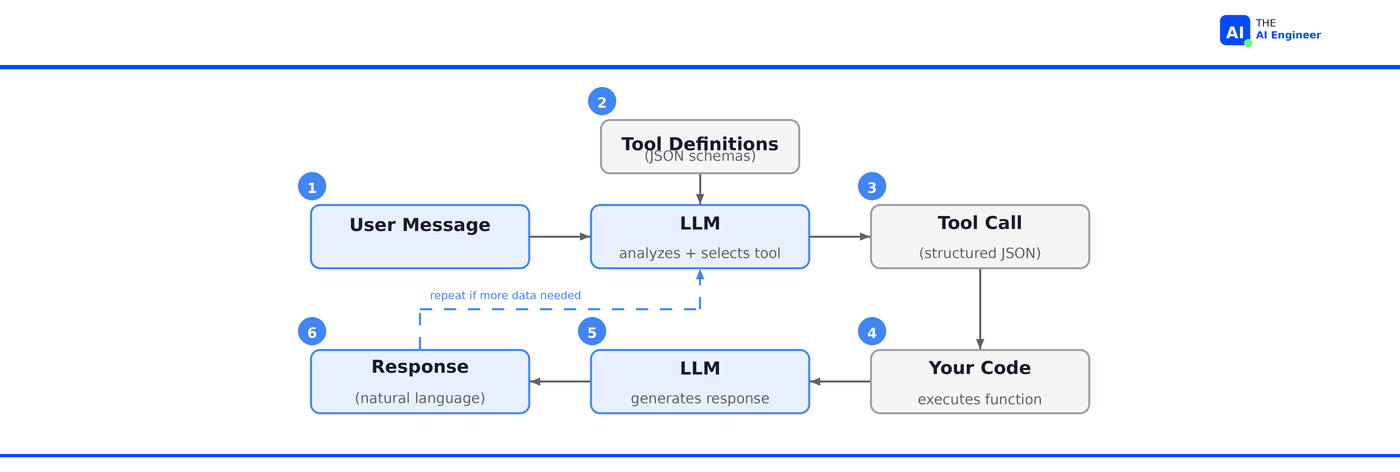
The exchange is a loop. If the model needs more information to complete the request, it can make another tool call before generating its final response.2
The Relationship: Function Calling → Tool Use → MCP
These three terms get used interchangeably, but they’re distinct layers of the same idea.
Function calling is the original term. OpenAI introduced it in June 2023. The model receives function definitions in JSON schema format and outputs structured calls. It’s model-specific: OpenAI’s format uses
parameters, Anthropic’s usesinput_schema. If you switch providers, you rewrite your tool definitions.Tool use is the broader concept. “Function calling” implies invoking a single function. “Tool use” captures the full picture: the model can call multiple tools in sequence, chain results, and decide when to stop. Anthropic uses “tool use” as their official term. In practice, most developers use the terms interchangeably.
MCP (Model Context Protocol) is the standardization layer. We covered this in Issue #3. Without MCP, every application hardwires its own tool definitions for its own model. With MCP, tools are hosted as standalone servers that any MCP-compatible model can discover and use. Function calling is how a model invokes a tool. MCP is how that tool gets discovered, described, and made available across applications.
Who’s Actually Building With This
Function calling is the default integration pattern for every AI product that does more than chat.
Stripe uses function calling to power their natural language interface for payment operations. An internal user can say “refund the last three charges from merchant X” and the system translates that into the correct sequence of Stripe API calls. The function definitions mirror the Stripe API surface: create charge, create refund, list transactions. The LLM handles the intent parsing that would have required a custom NLP pipeline.3
Shopify’s Sidekick uses tool calling to let merchants manage their stores through conversation. “Set the summer sale to 20% off all t-shirts starting Friday” requires multiple Shopify API calls: query products by category, create a discount, schedule the activation. The LLM sequences these calls based on a single natural language request. Before function calling, each of these operations required the merchant to navigate three different admin screens.4
Cursor’s agent mode (covered in Issue #4) uses function calling at massive scale. When you ask the agent to “add error handling to the payment module,” it calls tools to read files, search the codebase, and run tests. Their latest model, Composer, was trained via reinforcement learning in real development environments using these same tools. The model learned to sequence tool calls by actually doing the work. At 400M+ AI requests per day, the function calling mechanism is executing millions of tool invocations daily.
The pattern is the same everywhere: take an existing API surface, describe it as tool definitions, and let the LLM route natural language to structured calls.
🔍 Deeper Look: Martin Fowler’s engineering team published a detailed walkthrough of building a shopping agent with function calling, including the full system prompt design and multi-turn tool execution. If you’re implementing this in production, it’s the most rigorous reference available.
What Can Go Wrong (and What’s Overhyped)
Function calling works. But the gap between a demo and production is wider than the tutorials suggest.
Tool definitions eat your context window. Internal testing showed that 58 tools can consume roughly 55,000 tokens just for the definitions. That’s before the user even says anything. More tools means higher cost, higher latency, and worse selection accuracy. The model gets confused when choosing between similar tools. Production systems need strategies for this: tool grouping, dynamic loading, or MCP’s tool search capability which reduced token usage by 85% in tests.5
Argument extraction isn’t perfect. The model extracted “blue hoodie” and “size L” correctly in our example. In production, users say things like “the thing I ordered last week, you know the one.” The model has to decide: do I have enough to call the function, or do I need to ask a clarifying question? Getting this wrong means calling functions with bad arguments or annoying users with unnecessary follow-ups.
⚠️ Failure Alert: Stripe’s early agentic work ran into exactly this. Ambiguous merchant instructions caused the model to call functions with incomplete arguments, requiring a fallback clarification loop they hadn’t designed for. It’s now a standard part of their implementation pattern.
Security is your responsibility. The LLM decides what to call, but you decide what’s allowed. Without guardrails, a cleverly crafted prompt could trick the model into calling delete_all_users() if that function exists in the tool list. Every production system needs an execution layer that validates tool calls before running them: permission checks, rate limits, argument sanitization.6
Error handling is underspecified. What happens when the function returns an error? What if the API times out? What if the returned data contradicts the user’s question? The model needs to handle these gracefully, but most tutorials skip this entirely.
The hype check: function calling itself is accurately hyped. It genuinely is the mechanism that turns chatbots into agents. What’s overhyped is the idea that you just define some tools and ship it. The tool definitions, error handling, security layer, and observability around function calling are where the real engineering happens. The mechanism is simple. The production system around it is not.
The One Thing to Remember
Function calling isn’t a special mode. The model is still doing the only thing it knows how to do: generating the next token. The difference is that instead of generating English, it generates JSON that matches a schema you defined. The most powerful thing in AI right now is a JSON validator.
Where to Next?
📖 Go Deeper: “What is MCP?” We covered how MCP standardizes tool discovery and execution across models. Function calling is the mechanism underneath. Read Issue #3
🧱 Prerequisite: “What is an AI Agent?” Function calling powers the “act” in think-act-observe. Here’s the full loop. Read Issue #1
🔀 Related: “The AI Agents Stack (2026 Edition)” Function calling lives in Layer 2 (Protocols & Tools) of the agents stack. Here’s the full map.
What’s the weirdest thing you’ve seen a model try to call a function for? Or the most creative tool definition you’ve built? Drop it in the comments.
Prompt Engineering Guide, Function Calling in AI Agents.
Shopify Engineering, Building production-ready agentic systems.
Composio, Tool Calling Explained (2026 Guide). Data from Anthropic's tool search docs.