

Why Does AI Need a GPU?
The architectural difference that decides where AI runs.

You fine-tune a model for the first time. The code runs on your laptop, so you kick it off and go make coffee. You come back to an ETA of nine days. You move it to a 64-core server: faster, but still measured in days. Then you try a single GPU, and the same run finishes before lunch.
Same code, same data. The only thing that changed was the chip. Why does it crawl for days on one and finish in an afternoon on the other?
TL;DR
A GPU is thousands of small cores doing math at once; a CPU is a few big cores doing one thing at a time. A stadium of line cooks versus a handful of expert chefs.
AI is where that gap explodes. The same model trains tens of times faster on a GPU, so the chip you choose sets your training time and your bill.
It works because a neural network is the same tiny calculation repeated billions of times, none depending on another, the one job thousands of weak cores can split.
Every frontier model is built this way. Meta trained Llama 3.1 on 16,384 of NVIDIA’s H100 GPUs for 54 days straight.
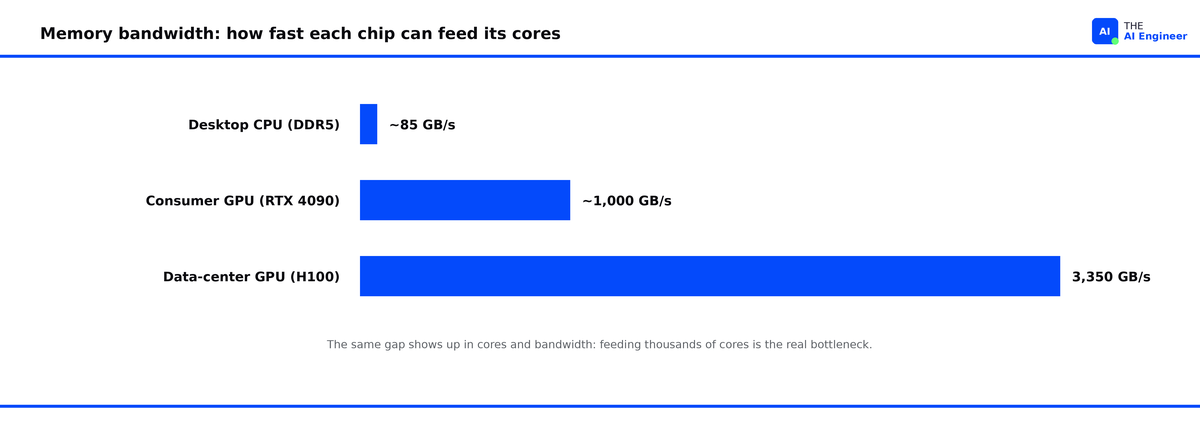
The counterintuitive part: the bottleneck is usually feeding the cores rather than adding more of them. A GPU’s memory runs about forty times faster than a desktop CPU’s.
The CPU: A Few Geniuses Working Fast
Every program runs on a CPU, and most always will. A CPU has a few very capable cores: 8 to 16 in a laptop, up to 128 in a big server. Each core is a generalist, with deep pipelines, branch prediction, and large caches, all built to rip through a complicated, unpredictable sequence of instructions as fast as possible. These are the expert chefs: only a handful of them, but each can take a complicated order and cook it start to finish.
Open a file, parse JSON, or run a loop where each step depends on the last, and the CPU is the right tool: that work is sequential and full of branches. The whole design exists to finish one chain of dependent steps as fast as possible.
Why the CPU Chokes on a Neural Network
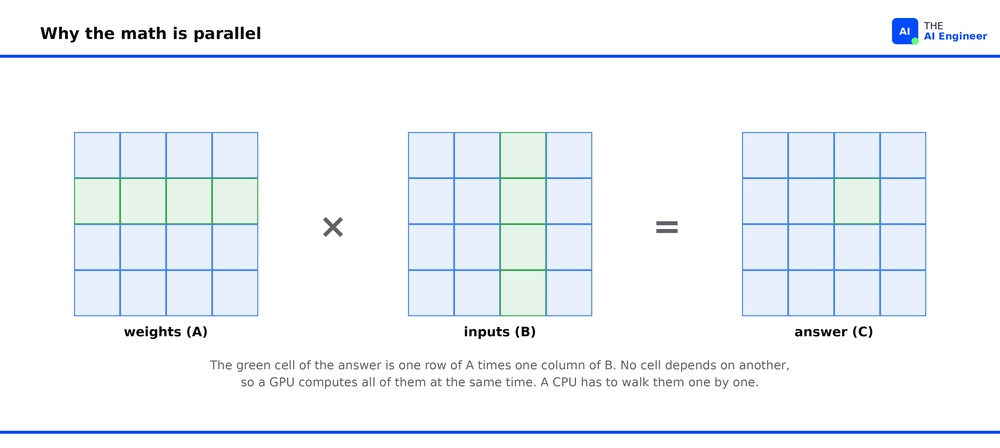
Point that CPU at a neural network and the strength becomes a liability. Training and inference are almost entirely matrix multiplication: take two grids of numbers, and for every cell in the output, multiply a row by a column and sum the results. A single layer of a modern model can be billions of these multiply-and-add operations. None of those operations depend on each other. Every cell in the output can be computed at the same time, in any order.
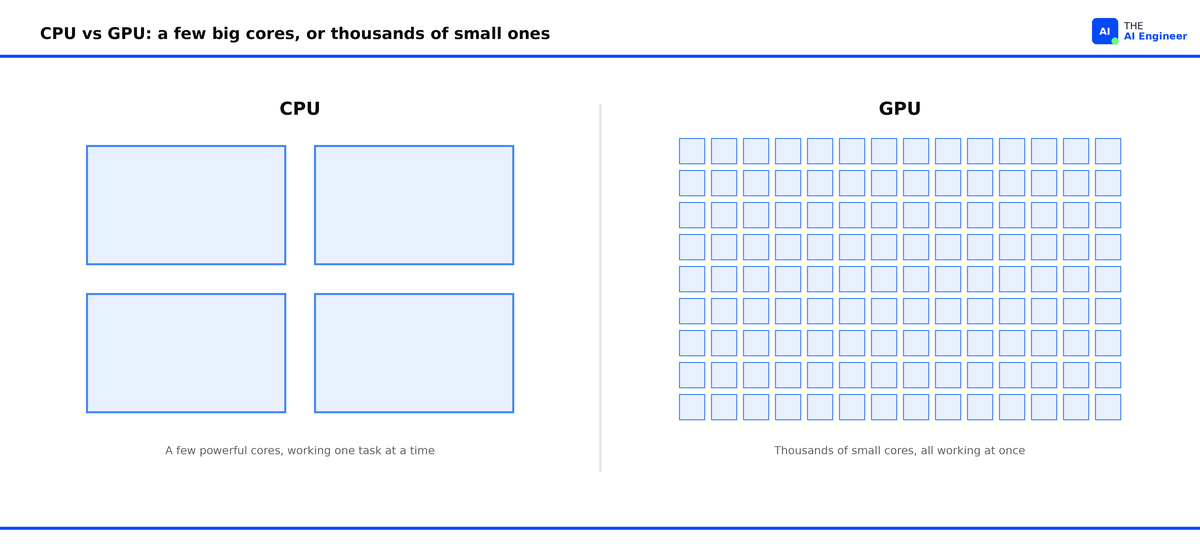
That is the worst possible match for a CPU. The branch prediction and deep pipelines exist to speed up dependent, branchy work, and matrix math gives them nothing to do. So the CPU grinds through billions of independent multiplications a few lanes at a time, with most of its machinery idle. Even a 128-core server runs only a few hundred multiply-adds per cycle against a problem that has billions ready to go at once. It is a stadium’s worth of work handed to a kitchen’s worth of chefs.
Put real numbers on it. One layer of a large model might multiply a 1,000-by-1,000 matrix, a million output cells, each needing a thousand multiply-adds: a billion operations for one layer, and a model has dozens of them. A CPU with 100 cores chews through maybe a few hundred at a time. A GPU dispatches them by the thousand. That is the whole race, and it is over before the CPU clears its first batch.
The GPU: A Stadium of Simple Cores
Neither chip was built for AI. The GPU was built to draw video games: millions of pixels recalculated sixty times a second, the same simple math across a huge grid all at once. That is exactly what running a neural network demands, so AI borrowed the graphics chip instead of the general-purpose one already in your machine.
Under the hood, that means thousands of tiny cores instead of a few powerful ones. An H100 has 16,896, an RTX 4090 has 16,384. Each core is simple and small, without the branch prediction and caching that make a CPU core fast at sequential work. That is exactly the trade you want for matrix math. You do not need clever cores; you need a huge number of them running the same instruction on different data at once. NVIDIA calls this SIMT, single instruction multiple threads, and it is the precise shape of the problem: one operation, multiply-add, run across millions of pieces of data. These are the line cooks: each one knows a single step, but there are thousands of them and they all chop at once.
Modern AI GPUs go one step further. Alongside the thousands of general cores, they pack a few hundred specialized units called Tensor Cores, each built to multiply two small grids of numbers in one step instead of one number at a time. An H100 has 528 of them, and they do the heavy lifting: most of the chip’s math throughput comes from these units rather than the general cores. It is specialization stacked on parallelism, hardware shaped to the exact operation a neural network repeats billions of times.
Thousands of cores are useless if you cannot keep them fed, so the other half of a GPU’s design is about moving data fast. This is memory bandwidth: how much data the chip can pull from its memory each second. AI GPUs use a special memory called HBM, stacked right on the chip, that moves data far faster than the DDR5 sticks in a normal computer, roughly forty times faster on a data-center GPU like the H100. That speed, more than the number of cores, is what decides most AI performance.
Put the two halves together and the speedup is obvious. The CPU walks through a billion multiplications a few hundred at a time. The GPU does thousands at once, with memory wide enough to keep every core fed.
There is one catch, and it is the reason a GPU is not always the answer. The GPU keeps its data in its own memory, so to work on anything the computer first sends it across the PCIe bus, the data link between the CPU and the GPU. That link is far slower than the GPU’s own memory. For a big batch, you load once and then compute for a long time, so the loading barely matters. For a single small request, the trip in and back can take longer than the actual work.
What Runs Where
This is why every frontier model is trained on GPUs, and the clusters are enormous. Meta trained Llama 3.1 405B on 16,384 H100 GPUs running for 54 days, pushing more than 15 trillion tokens through the model1. No CPU cluster could finish that much matrix multiplication on any sane timeline or budget, and choosing which GPU fills a cluster like that is a decision in itself, the subject of H100 vs H200 vs B200.
Training is the one-time cost. Inference is the forever cost: the work of serving the model, where every prompt sends another pass of matrix math through the GPU. A model is used far more than it is trained, so over its life serving it costs more than building it, which is why so much hardware work now goes into making inference cheaper.
The CPU has not disappeared. In a real AI system it runs the orchestration: loading data, tokenizing text, running the web server, deciding which GPU does what. NVIDIA takes that job seriously enough to build a chip for it. Vera, its 2026 data-center CPU, is designed around exactly this coordination work, so a rack of GPUs stays busy computing instead of waiting on the CPU to feed it. The CPU keeps the pipeline moving while the GPU does the math2.
When You Don’t Need a GPU
Not every AI workload needs a GPU, and assuming it does burns money. Three cases where the CPU is fine or better:
Small models and light traffic. A small classifier, an embedding lookup, or a quantized model serving a few requests a second often runs comfortably on a CPU. If the model fits in cache and traffic is low, a GPU sits mostly idle, a five-figure chip doing a job a laptop could.
Latency-bound, single-request work. The GPU’s edge is throughput across a big batch. Serve one request at a time under a tight latency budget and you may not fill enough lanes for the GPU to beat a CPU.
Everything that is not matrix math. Data cleaning, feature engineering, business logic: the code around the model is branchy and sequential, which is CPU territory by design.
The overhyped part is treating “AI” and “GPU” as synonyms. AI is the matrix math; the GPU is just the chip that does matrix math thousands of lanes wide. Reach for it when your bottleneck is parallel arithmetic. Otherwise the CPU is cheaper and often faster.
💬 Where have you seen a GPU paying rent for a job a CPU could have done? Tell me in the comments.
The One Thing to Remember
A GPU makes one trade: it gives up doing a single complicated thing quickly in exchange for doing thousands of simple things at once. A neural network is the perfect customer for that trade. It is not one hard problem; it is billions of tiny, identical, independent calculations. So once you see AI as parallel arithmetic, every hardware question collapses into two: how wide is your arithmetic, and how fast can you feed it?
Where to Next?
📖 Go Deeper: What is a GPU?. The chip’s internals: streaming multiprocessors, CUDA cores, and how it is laid out.
🔗 Go Simpler: What Does NVIDIA Actually Do?. The company behind the chips AI runs on, in plain terms.
🔀 Go Adjacent: H100 vs H200 vs B200. Once you know why you need a GPU, which one to actually rent.
🗺️ If you are transitioning into AI engineering, How to Break Into AI Engineering in 2026 is the full roadmap on getting there.
🔜 Friday: How Perplexity Built Their Search Engine. The retrieval architecture behind the answer engine.
1 Introducing Llama 3.1 (Jul 2024)
2 NVIDIA Vera CPU (2026)
Waiting for Friday
I am more interested in how it's being differentiated apart from Google search and how reliably they do it