

What is a GPU?
The $28,000 chip that made AI possible, and why your CPU never stood a chance.

You call the GPT-4 API. It responds in two seconds. Behind that two-second response, a cluster of GPUs just performed roughly 10 trillion matrix multiplications, chained across 120+ transformer layers, each involving millions of floating-point numbers.
Try running that on your CPU. Not hypothetically. An academic benchmark tested 4096×4096 matrix multiplication across both architectures: the optimized parallel CPU version (8 cores, fully utilized) finished 45x slower than a mid-range GPU. Scale that to transformer-sized workloads, and the gap widens to thousands of times.1
That’s not a speed difference. That’s a fundamentally different approach to computation. And it’s the reason one particular chip design, originally built for rendering video game graphics, became the engine behind every AI breakthrough of the last decade.
TL;DR
A GPU is a processor with thousands of CUDA cores that all perform the same math operation on different data simultaneously. Think of it as trading one engineer who can handle any task for a thousand interns who each only know how to multiply two numbers and add.
GPUs dominate AI because neural networks run on matrix multiplication, and matrix multiplication is embarrassingly parallel: every element in the output can be computed independently.
Three GPU specs matter for AI: memory bandwidth (how fast data moves to the cores), VRAM capacity (how much model fits on-chip), and tensor cores (hardware that performs entire matrix multiplications in a single operation).
GPU costs dominate AI budgets. A single high-end data center GPU like the H100 sells for ~$28,000. Cloud pricing runs $2-4/hour. Most organizations waste over half their GPU compute through poor batching and memory fragmentation.
GPUs aren’t faster than CPUs. A CPU finishes any single calculation faster. But neural networks don't have one calculation. They have billions, all independent, and a GPU does them all at once.
CPUs Were Built for a Different Kind of Math
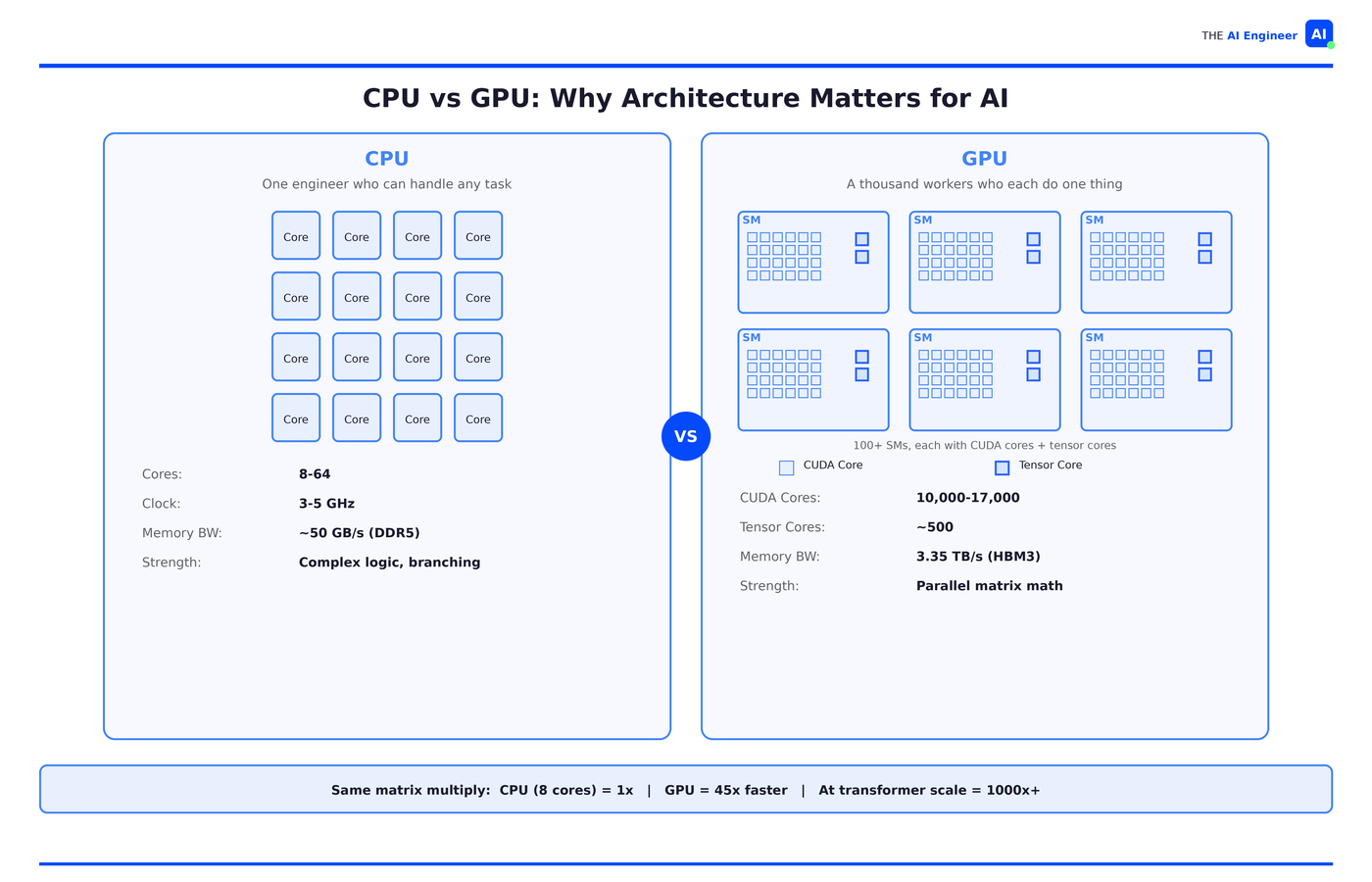
Your CPU has 8 to 64 powerful cores, each with branch prediction, speculative execution, and deep cache hierarchies. It’s optimized for latency: how fast can I finish this one thing?
Neural networks don’t need that. They need a processor that can multiply matrices. Lots of them. All at once. A transformer attention layer requires five matrix multiplications per head, per layer, per token. At 120+ layers, every API call triggers billions of independent math operations.
Your CPU, with 16 cores and vector extensions, processes maybe 32 of those in parallel. A GPU processes tens of thousands simultaneously. Same math. Radically different architecture for doing it.
How a GPU Actually Works
Back to our analogy. The senior engineer (your CPU) is brilliant. Can debug anything, context-switch between twelve projects, handle ambiguity, make judgment calls. But there’s only one of them.
The GPU is a room of a thousand interns. Each one does one operation: multiply two numbers and add the result. They can’t debug, branch or improvise. But when every row in a massive spreadsheet needs the same formula applied, they finish before the engineer even gets started.
AI is that spreadsheet. A neural network layer takes inputs, multiplies them by weights, and adds. That’s it. The same multiply-and-add the interns already know, repeated millions of times across the layer with zero dependencies between them.
The Architecture
Whether it’s built by NVIDIA, AMD, or Google, every data center GPU is built on the same design architecture:
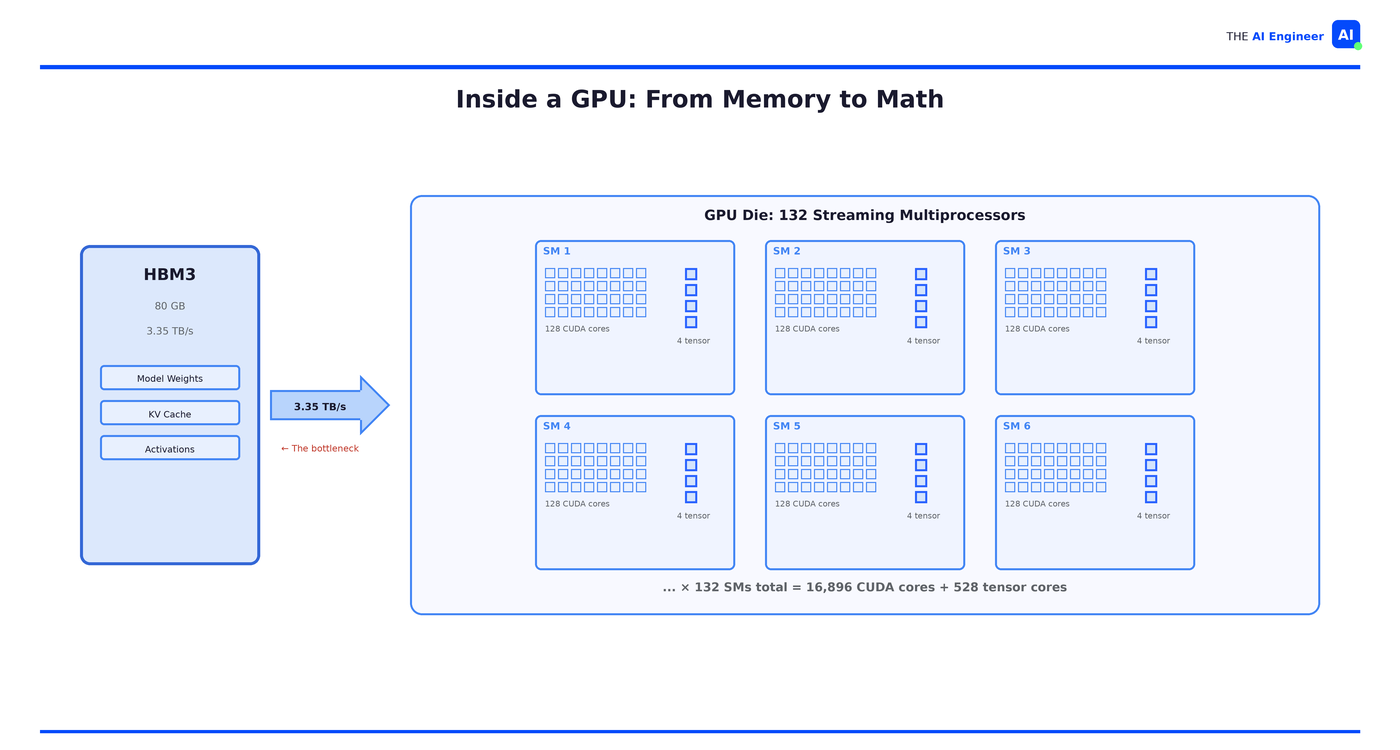
Streaming multiprocessors (SMs). A high-end GPU has over 100 of these. Each one is a small processor with its own local memory and scheduling logic, coordinating the cores inside it.
CUDA cores. Each SM packs hundreds of them, totaling 10,000-17,000 across the chip. Each single one does exactly one thing: a single multiply-and-add operation, billions of times per second.
Tensor cores. This is why a data center GPU costs 15x more than a gaming card. Tensor cores perform entire small matrix multiplications (4×4 or 8×8) in a single operation, replacing dozens of instructions on the CUDA cores. Without them, AI training on GPUs would be orders of magnitude slower.
High Bandwidth Memory (HBM). An H100 has 80GB of HBM3 running at 3.35 TB/s. Your laptop's DDR5 does maybe 50 GB/s. That's a 67x gap, and it matters more than most engineers realize: in most AI workloads, memory bandwidth is the actual bottleneck, not compute. Interns that can calculate in nanoseconds still sit idle when data arrives in milliseconds.
🏗️ Engineering Lesson: When evaluating GPU infrastructure, memory bandwidth and VRAM capacity matter more than raw TFLOPS for most inference workloads. A model that doesn’t fit in VRAM falls off a performance cliff. Rule of thumb: ~2GB of VRAM per billion parameters for inference, ~16GB per billion for full fine-tuning.
The One Operation That Powers All of AI
Take a 4×4 matrix multiply. To compute one element in the output, you take one row from the first matrix and one column from the second, multiply the pairs together, and sum the results. That’s it. And the element next to it uses a different row-column pair with the exact same operation. No element in the output needs to know what any other element computed. Scale that to 1024×1024 and you have over a million independent calculations, all doing the same multiply-and-sum.
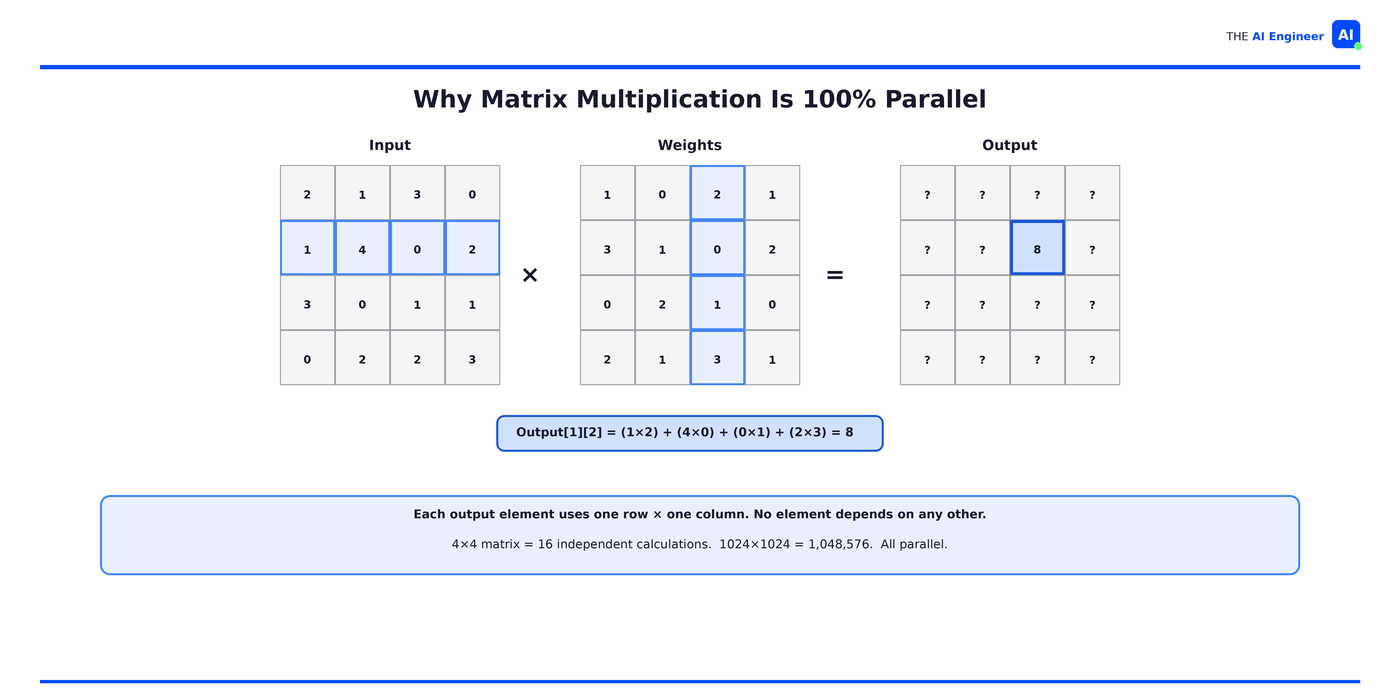
That’s not a simplified example. That’s literally what happens inside a transformer every time you hit an API:
# A transformer attention layer:
Q = input @ W_q  # matrix multiply
K = input @ W_k  # matrix multiply
V = input @ W_v  # matrix multiply
attention = softmax(Q @ K.T / sqrt(d_k)) @ V  # more matrix multiplies
Every @ is a matrix multiplication. Every matrix multiplication is a million independent multiply-and-sums. Every one of those is a task the interns can do without talking to each other.
Who’s Actually Building With This
OpenAI used over 10,000 GPUs to train GPT-4. Training involved processing trillions of tokens through billions of parameters. On CPUs, that training run would have taken decades. On GPUs, months. The cost was still enormous (estimated $50-100 million in compute alone), but the alternative was “impossible in any practical timeframe.” That’s the GPU value proposition in one line: it makes previously impossible math merely expensive.
Inference at scale tells the same story. Every major cloud AI service (ChatGPT, Claude, Gemini, Copilot) runs on GPU clusters serving millions of concurrent users. The math is the same matrix multiplications, just without the training loop. CPUs can handle one-off requests for small models, but the moment you need sub-second latency at thousands of requests per minute, you need GPU parallelism.
OpenAI’s 2024 inference spend hit $2.3 billion, roughly 15x what GPT-4 cost to train. Training happens once. Serving never stops. That’s why inference now accounts for 55% of all AI infrastructure spending, up from 33% in 2023.2
Uber ran one of the largest XGBoost ensembles in the world on CPUs to predict arrival times. Eventually they hit a wall: the model and dataset couldn’t scale further on CPU infrastructure. They switched to DeepETA, a deep learning model served on GPUs via NVIDIA Triton, now handling hundreds of thousands of ETA predictions per second across every ride and delivery globally.3
What Can Go Wrong (and What’s Overhyped)
The cost problem is real. An 8-GPU cluster costs $200,000+. Cloud pricing runs $2-4 per GPU-hour. For a startup running inference at scale, GPU costs can dwarf every other line item. Most teams are GPU-limited: they have more ideas than compute to test them.
Not everything needs a GPU. Classical ML (random forests, gradient boosting, logistic regression) runs fine on CPUs. Small model inference with quantization works on consumer hardware. If your model is small enough to run on a single CPU core and you’re processing one request at a time, a GPU might actually be slower due to data transfer overhead. For small, infrequent inference tasks, that transfer cost can exceed the compute savings.
Most organizations waste their GPUs. Anyscale published data showing production AI workloads typically achieve only 20-50% GPU utilization. The culprit: CPU-heavy preprocessing stages that starve the accelerator. After implementing workload decomposition with Ray, organizations saw 50-70% improvements in utilization, more than halving compute costs. Buying GPUs is the easy part. Keeping them busy is where most team fails.4
GPUs aren’t the only game in town anymore. Google, Amazon, and Microsoft are all building custom AI chips. So are startups. LG AI Research tested FuriosaAI’s RNGD inference chip against their GPU servers and got 2.25x better performance per watt. In the same data center rack, they fit five RNGD servers where one GPU server used to go, pulling 3kW each instead of 10kW+. For inference workloads, specialized silicon is starting to win on efficiency. For training, GPUs still dominate. The split is real, and it’s widening.5
The One Thing to Remember
GPUs weren’t designed for AI. They were designed to render video game graphics. But rendering millions of pixels on a screen turns out to require the same kind of math as training a neural network: the same operation, applied independently, millions of times.
The algorithms behind deep learning existed for decades. The training data existed for years. What was missing was hardware that could do the math at a price that made it practical. GPUs were that hardware. Not because anyone planned it, but because the architectural match between pixel rendering and matrix multiplication was close to perfect.
That match is the entire reason AI works today. The engineer was always brilliant. But AI needed a thousand interns. And they were already in the building, rendering video games.
Where to Next?
🔬 Go Deeper: What Does NVIDIA Actually Do? (Thursday) digs into the full stack: hardware, software, ecosystem, and why one company captured 80%+ of the AI chip market.
📗 Prerequisite: If embeddings and vector math are fuzzy, start with What are Embeddings? for the mathematical foundation GPUs are built to accelerate.
🔀 Related: Why is Inference Slow and Expensive? (dropping in 4 weeks) picks up where this issue ends: the specific bottlenecks when your GPU is actually serving models, and why most of the hardware sits idle.
Ansari et al., Accelerating Matrix Multiplication: A Performance Comparison Between Multi-Core CPU and GPU (2025).
Uber Engineering, DeepETA: How Uber Predicts Arrival Times Using Deep Learning.
Anyscale, GPU (In)efficiency in AI Workloads.
really great explanation here!!
That's help me a lot to understand GPU