

What is Quantization?
The JPEG trick that cuts your GPU bill 75%

🧭 Part 5 of 8 of the ⚡ Hardware & Inference course
Your team just spent three months fine-tuning Llama 3 70B for your customer support pipeline. The model is sharp. Accurate. Fast on your test bench. One problem: running it in production requires 140 GB of GPU memory. That’s two A100 80GB GPUs just to load the weights, before a single customer query hits the system. Your monthly GPU bill alone: over $5,000. Your CTO asks if there’s a smaller model you could use instead. There is a better question: what if the same model could run on a single GPU for a quarter of the cost?
That’s the problem quantization solves.
TL;DR
Quantization is lossy compression for model weights. Think JPEG for AI: you reduce the file size by lowering the precision of every number in the model, and just like a well-compressed photo, the output is nearly indistinguishable from the original.
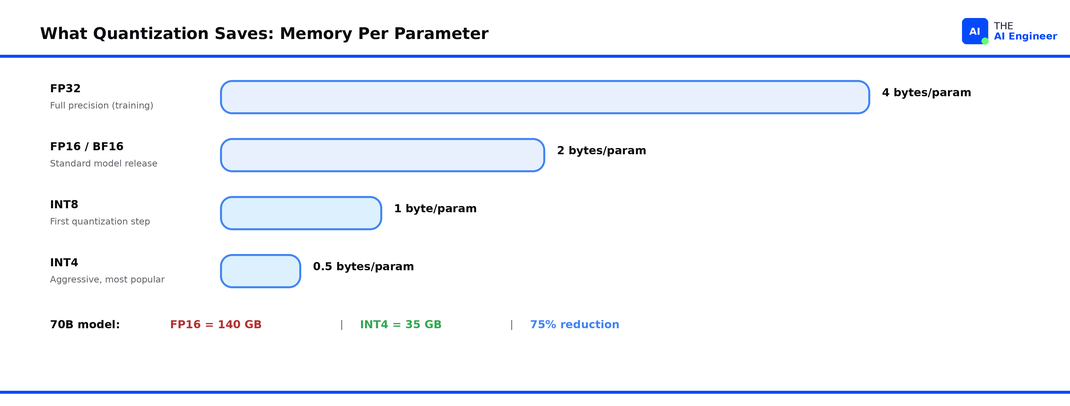
It matters because GPU memory is the bottleneck. A 70B-parameter model in standard FP16 precision needs ~140 GB of VRAM. Quantize it to 4-bit and that drops to ~35 GB, enough to fit on a single GPU.
If you read What is a GPU?, you know VRAM is the bottleneck. Quantization is the first tool that fixes it.
The mechanism is simple: take each weight (stored as a 16-bit floating-point number) and map it to a lower-precision format (8-bit integer, 4-bit integer, or a specialized format like NF4). The model uses less memory, runs faster, and costs less to serve.
Everyone ships quantized models. Meta releases official FP8 and INT4 variants of Llama. Hugging Face hosts thousands of GGUF and AWQ quantized checkpoints. Every major serving engine (vLLM, llama.cpp, TGI) supports quantized inference natively.
The counterintuitive part: 4-bit quantization can preserve over 99% of a model’s original performance. The quality loss most teams fear is, for most tasks, smaller than the variance between prompts.
Let’s get into it.
How Models Store Numbers
Every parameter in a neural network is a number. During training, those numbers are stored as 32-bit floating-point values (FP32), each one taking up 4 bytes of memory. A 70-billion-parameter model at FP32 would need 280 GB just for the weights. That’s why most models release in FP16 or BF16 (half-precision, also called brain floating-point, a format Google created that keeps the same dynamic range as FP32 but uses half the storage), which cuts the requirement in half to 140 GB.
FP32 is your uncompressed RAW photo. FP16 is a high-quality JPEG. The image looks the same to you, but the file is half the size. Quantization takes this further. It asks: what if we compress to 8-bit, or even 4-bit? How much quality can we keep while making the file dramatically smaller?
The answer, it turns out, is: a lot.
📗 Prerequisite: We covered GPU memory, VRAM, and why it’s the real bottleneck in What is a GPU?. Quick version: GPUs process AI workloads in parallel, but they can only work on data that fits in their onboard VRAM. If the model doesn’t fit, it doesn’t run.
Why FP16 Breaks Down
Let’s go back to the Llama 70B scenario. Your model is in FP16. Each of those 70 billion parameters takes 2 bytes. That’s 140 GB for the weights alone. But you also need memory for the KV cache (the temporary memory the model builds as it processes your input token by token), activation tensors, and framework overhead. Realistically, you need 180+ GB to serve this model at reasonable context lengths.
That means you need either two A100 80GB GPUs ($3.50/hour each on cloud providers) or one H100 80GB ($5+/hour). For a customer support pipeline running 24/7, that’s $5,000 to $8,000 per month on GPU costs alone, before you count networking, storage, or engineering time.
And here’s the real frustration: most of those 140 GB of weight data are storing precision your model doesn’t actually need. The difference between storing a weight as 0.0023841858 (FP16) and storing it as 0.0024 (INT8 approximation) has almost no measurable impact on the model’s output quality. You’re paying for precision that doesn’t change the answer.
⚠️ Confusion Alert: Quantization is not the same as using a smaller model. A quantized 70B model and a natively trained 8B model are very different things. The 70B model has fundamentally more knowledge and capability, it’s just stored more efficiently. Distillation (training a smaller model to mimic a larger one) is a separate technique entirely.
How Quantization Actually Works
Quantization exists because neural network weights don’t need full floating-point precision to produce useful outputs. Here’s how it works.
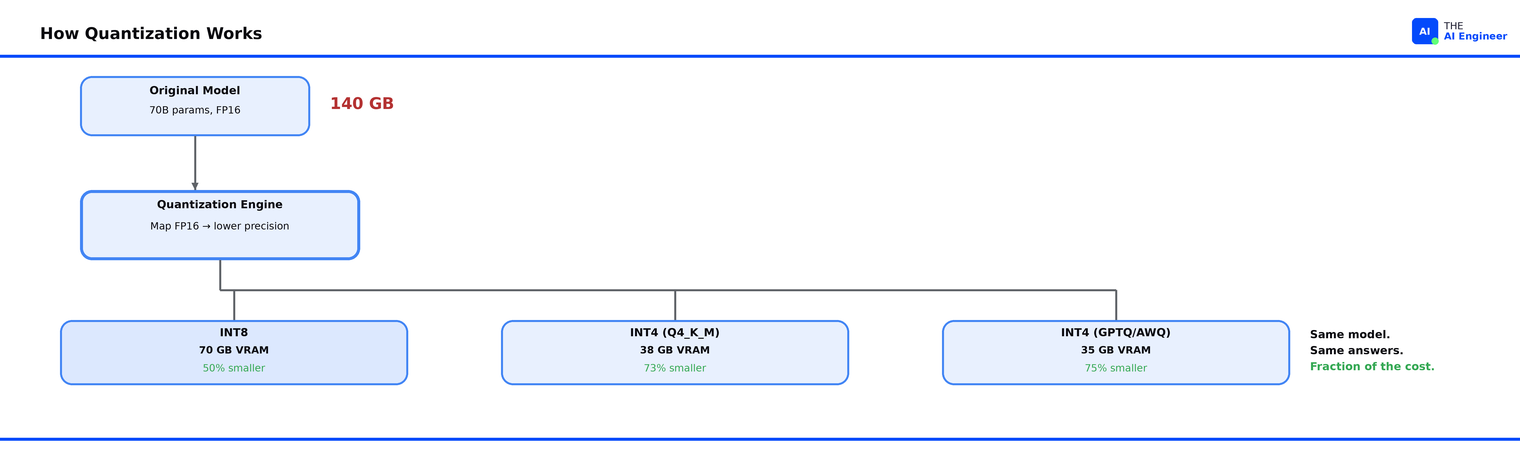
The core idea is mapping. Take a range of floating-point values and map them onto a smaller set of integers. The simplest version works like this:
Look at all the weights in a layer (or a block of weights).
Find the minimum and maximum values.
Divide that range into 256 bins (for INT8) or 16 bins (for INT4).
Assign each weight to its nearest bin.
Store the bin index (an integer) plus a small scaling factor to reconstruct the approximate original value.
Back to our JPEG analogy: this is exactly what JPEG does with pixel colors. A 24-bit color gets mapped to a smaller palette. Most of the time, your eyes can’t tell the difference. With quantized weights, most of the time, the model’s outputs can’t tell the difference either.
In practice, there are two main approaches:
Post-Training Quantization (PTQ) takes an already-trained model and converts the weights after the fact. No retraining required. You download a FP16 model, run a quantization tool, and get a smaller model. This is what GPTQ, AWQ, and GGUF quantization all do. PTQ is by far the most common approach because it’s fast, requires no training data, and works on any model.
Quantization-Aware Training (QAT) simulates the effects of quantization during training, so the model learns to be robust to lower precision from the start. QAT produces better results at extreme low bit-widths (2-3 bit) but requires the original training infrastructure, which for a 70B model means a GPU cluster most teams don’t have access to. Meta used QAT for their official quantized Llama 3 lightweight releases.
Here's what loading a quantized model actually looks like. This is the entire process for going from a standard Hugging Face model to a 4-bit quantized version:
# Loading a 4-bit quantized model with Hugging Face + bitsandbytes
from transformers import AutoModelForCausalLM, BitsAndBytesConfig
import torch

quantization_config = BitsAndBytesConfig(
    load_in_4bit=True,
    bnb_4bit_quant_type="nf4",
    bnb_4bit_compute_dtype=torch.bfloat16,
    bnb_4bit_use_double_quant=True,
)

model = AutoModelForCausalLM.from_pretrained(
    "meta-llama/Llama-3.1-8B-Instruct",
    quantization_config=quantization_config,
    device_map="auto"
)
# 8B model that normally needs ~16 GB now loads in ~5 GB
There’s a crucial detail that makes 4-bit quantization work so well. Tim Dettmers and his team at the University of Washington discovered that neural network weights follow a normal distribution1. They created NF4 (4-bit NormalFloat, a data type specifically designed for normally distributed data), where each quantization bin captures an equal share of the distribution. The result: NF4 preserves more information per bit than generic INT4 or FP4 formats.
🔍 Deeper Look: Maarten Grootendorst’s Visual Guide to Quantization has 50+ custom diagrams walking through absmax, zero-point, and per-channel calibration methods. If you want to understand the math behind the mapping, it’s the best single resource. https://newsletter.maartengrootendorst.com/p/a-visual-guide-to-quantization
Who’s Actually Building With This
Meta releases official quantized variants of every Llama model. When Llama 3.1 launched, Meta quantized the 405B model from BF16 to FP8 specifically so it could run within a single server node. The FP8 version quantizes only the weights and activations of the linear operators within the transformer blocks, leaving other components at higher precision. The result: the 405B model fits on a single 8xH100 node in FP8, instead of requiring multiple nodes at full BF162.
Neural Magic took this further by quantizing every linear module in the 405B (Meta’s original version skipped 510 of them), achieving 99.91% accuracy recovery on the OpenLLM benchmark while cutting memory by roughly 50%.3
The llama.cpp community took a different path entirely. Georgi Gerganov’s llama.cpp project pioneered GGUF, a file format built specifically for storing quantized model weights with the metadata needed for fast loading. Unlike GPTQ and AWQ, GGUF runs on CPUs and Apple Silicon Macs, not just NVIDIA GPUs. The community’s go-to quantization level is Q4_K_M, a mixed-precision 4-bit format that assigns different bit-widths to different weight groups based on their sensitivity. It hits the sweet spot: a 70B model compresses from 140 GB to roughly 40 GB, enough to run on a single consumer GPU with 48 GB of VRAM, or via CPU offloading on a machine with 64 GB of RAM.
The surprise that changed fine-tuning. Before QLoRA, fine-tuning a 65B model required at minimum 780 GB of GPU memory across multiple high-end GPUs. Dettmers’ team showed that by freezing the base model in 4-bit NF4 precision and training only small LoRA adapters at full 16-bit precision, a 65B model could be fine-tuned on a single 48GB GPU4. Their Guanaco model reached 99.3% of ChatGPT’s performance on the Vicuna benchmark with just 24 hours of training on one GPU. QLoRA didn’t just save memory during inference. It made fine-tuning accessible to teams that could never afford it before.
What Can Go Wrong (and What’s Overhyped)
Quantization has real tradeoffs. Here’s where teams get burned.
Math and reasoning tasks degrade first. When you reduce precision, the tasks that suffer most are ones requiring precise numerical computation: multi-step math, complex logical reasoning, and code generation with exact syntax. A model that’s 98% as good on general Q&A might drop noticeably on GSM8K (a standard benchmark of 8,500 grade-school math problems used to test reasoning ability) at 4-bit. If your use case is primarily reasoning-heavy, test at your target quantization level before committing.
Smaller models are more sensitive. A 70B model quantized to 4-bit retains quality well because there’s so much redundancy in those 70 billion parameters. A 7B model at the same 4-bit level loses more, because each parameter carries proportionally more weight. The rule of thumb: quantize the largest model that fits your latency budget. Don’t quantize a small model to save a few more gigabytes.
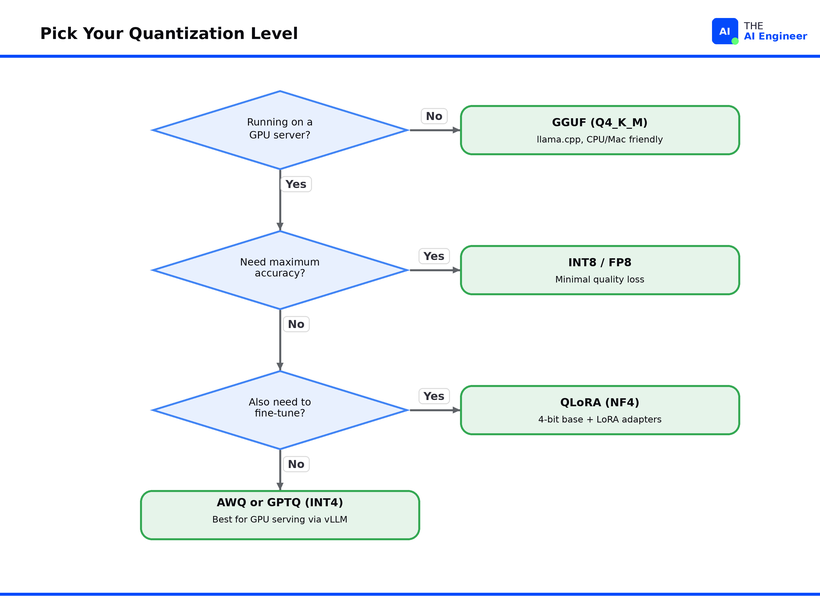
The format zoo is confusing. GPTQ, AWQ, GGUF, EXL2, HQQ, SqueezeLLM. The number of quantization formats proliferated faster than the community could standardize. Each format has different strengths (GPTQ for GPU inference, GGUF for CPU/hybrid, AWQ for activation-aware accuracy) and each requires specific tooling. This fragmentation is getting better as vLLM and llama.cpp consolidate support, but it’s still a real barrier for teams deploying their first quantized model. We’ll break down exactly which format to pick in Quantization in Practice: GPTQ vs AWQ vs GGUF, coming soon.
The hype check. The claim “quantization has no quality loss” that you see in blog posts and README files is usually tested on a narrow set of benchmarks. Neural Magic’s FP8 quantized Llama 3.1 405B scores 86.55 on OpenLLM versus 86.63 for the unquantized model, a 99.91% recovery rate. That’s impressive, and it’s real. But benchmarks measure averages. Your specific use case, your specific data distribution, your specific edge cases: those need testing. Run your benchmarks on your data before committing to a quantization level. README numbers are averages. Your edge cases aren't.
The One Thing to Remember
Quantization doesn’t make models dumber. The knowledge is already in the weights. What quantization does is strip away the precision those weights don’t need, so the knowledge fits where you can actually afford to run it. The JPEG analogy holds all the way through: the best compression is the one where nobody can tell you compressed at all.
What’s the first model you’d quantize, and what’s stopping you? Hit reply and tell me. I’ll share the most interesting answers next week.
Where to Next?
📖 Go Deeper: Quantization in Practice: GPTQ vs AWQ vs GGUF drops soon with head-to-head benchmarks and a decision framework for picking the right format (coming soon).
🔗 Go Simpler: What is a GPU? covers the hardware layer underneath all of this: VRAM, memory bandwidth, and why GPUs exist in the first place.
🔀 Go Adjacent: What Does NVIDIA Actually Do? explains the company whose chips power the GPUs your quantized models run on.
🧭 Start Here: New to AI engineering? How to Break Into AI Engineering in 2026 is the career roadmap that ties every issue together.
Dettmers et al., QLoRA: Efficient Finetuning of Quantized LLMs (Nov. 2023).
Meta, Introducing Llama 3.1 (July 2024).
Neural Magic, Meta-Llama-3.1-405B-Instruct-FP8-dynamic (July 2024).
Dettmers et al., QLoRA: Efficient Finetuning of Quantized LLMs (Nov. 2023).