

Quantization in Practice: GPTQ vs AWQ vs GGUF
Three formats run at 4-bit. So why does one run 10x faster?

🧭 Part 6 of 8 of the ⚡ Hardware & Inference course
You picked Qwen2.5-32B for your project. At full precision, the model is 64 GB. The H100s and H200s that can hold it cost $2-4 an hour to rent and $30,000+ to buy. Most teams don’t have one sitting around.
The standard fix is quantization: shrink the model’s weights from 16-bit numbers to 4-bit numbers, drop the memory footprint by 4x, and run it on a GPU you can actually afford. The problem is that you have to pick a format first, and Hugging Face will show you six versions of Qwen2.5-32B that all claim to be 4-bit: GPTQ-Int4, AWQ, three flavors of GGUF, and one labeled bitsandbytes-NF4.
Pick wrong and you waste a weekend on a format your serving framework can’t load efficiently, lose half the throughput you paid for, or watch the model’s code generation accuracy collapse on your domain. Pick right and the same model runs 1.6x faster than the original FP16 version on the same GPU, with accuracy within four points of the full-precision baseline.
This issue tells you which one to pick, and why the choice depends on something most teams don’t think about.
TL;DR
The format you pick matters less than the kernel that runs it. AWQ on the wrong kernel runs at 68 tok/s. AWQ on the right kernel (Marlin) runs at 741 tok/s. Same weights, same GPU, ~10x speedup. So the real decision is: which inference stack are you using? That determines everything else.
Serving with vLLM on an NVIDIA GPU? Use AWQ. It’s the best speed-quality tradeoff in the Marlin ecosystem.
Running on a laptop, Mac, or CPU? Use GGUF Q4_K_M. It’s the only format with kernels for non-NVIDIA hardware.
Already shipping GPTQ? Keep it. Just switch the kernel to Marlin and you’ll get most of AWQ’s speed without re-quantizing.
The benchmarks below show why. The decision tree after that walks through the edge cases.
What Are We Even Comparing?
What is Quantization? covered the basics: short version: a 16-bit weight can take one of 65,536 distinct numeric values (2¹⁶), enough to represent fine gradations from large negative to large positive. A 4-bit weight can take one of 16 values (2⁴). Quantization picks those 16 representative values per weight group and rounds every original weight to the nearest one. Memory drops 4x because each weight now needs 4 bits to store instead of 16. Accuracy holds up because LLM weight distributions are heavily peaked around zero, so 16 well-chosen values cover ~95% of real weights closely enough. The trick is choosing those 16 values well, and here's how each format does it:
GPTQ is an algorithm. It quantizes weights one column at a time and uses second-order information from the Hessian matrix to nudge the remaining unquantized weights, compensating for the error introduced by each step.
AWQ is also an algorithm. It identifies the ~1% of weight channels with the largest activation magnitudes during a calibration pass, then scales those weights up before quantizing. This protects the channels where small errors get amplified the most.
GGUF is not an algorithm. It’s a file format. The successor to GGML, designed by the llama.cpp team. The actual quantization inside a GGUF file uses standard scale-and-zero-point math, but with a clever block plus sub-block structure (each Q4_K_M block has 256 weights divided into 8 sub-blocks of 32, with separate scales for each level).
The category difference matters for downstream choices. AWQ and GPTQ store their output in a layout that GPU serving engines (vLLM, TGI, TensorRT-LLM) can all read, so the same checkpoint runs on whichever one you pick. GGUF’s layout was built for laptops and Macs, not GPUs, so the GPU engines never built fast loaders for it. Pick AWQ or GPTQ, your runtime stays open. Pick GGUF, you’ve effectively picked llama.cpp.
There’s a fourth player worth naming so we can move past it: bitsandbytes, which quantizes on-the-fly at model load time, no pre-quantized checkpoint required. The runtime cost is real (168 tok/s in vLLM, ~4.5x slower than Marlin-AWQ) because the format dequantizes weights into FP16 on every forward pass, where Marlin fuses dequant and multiply into one kernel. The convenience exists for a reason; so does the speed gap. We’ll come back to it in the Honest Take.
How Each One Quantizes
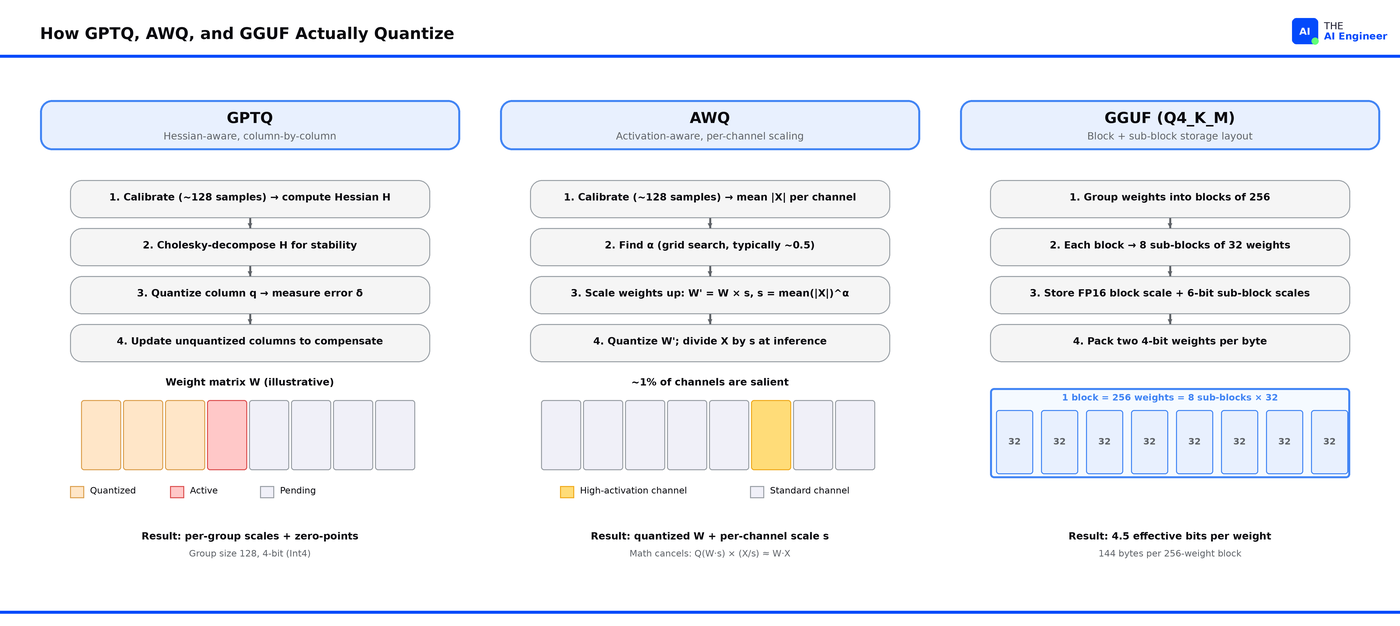
GPTQ: quantize, measure the damage, fix the rest. GPTQ walks through each weight matrix one column at a time. After rounding a column to 4-bit, it measures how much that rounding hurt the model’s output, then nudges the columns it hasn’t touched yet to make up for the damage1. By the time it finishes the last column, the cumulative error is much smaller than if it had quantized every column independently. The “nudge” calculation needs to know which weights are sensitive, so GPTQ first runs 128 to 1024 sample prompts through the model to build a sensitivity map (formally, the Hessian of the loss). If quantizing column q introduces error δ_q, the optimal update to column i is:
w_i -= (δ_q / H[q][q]) × H[q][i].
AWQ: protect the weights that matter most before quantizing. AWQ runs a sample of prompts through the model to find those important columns, then multiplies them by a scaling factor (say, 4) before rounding. The rounding precision doesn’t change (still 16 values), but the scaled-up weights occupy a larger range, so the rounding error becomes a smaller fraction of each weight’s value. At inference time, AWQ divides the matching input activations by 4. The math cancels out: same output, smaller rounding damage on the important columns.
Q(W × s) × (X / s) ≈ W × X.
GGUF Q4_K_M: stop being clever, just store more scales. No calibration prompts. No sensitivity analysis. GGUF takes each weight matrix and chops it into blocks of 256 weights. Each block gets its own scale and zero-point. Then each block gets chopped again into eight sub-blocks of 32 weights, and each sub-block gets its own scale too. Now when you quantize, the 16 available values can adapt to each tiny region of the weight matrix. Storing all those scales costs ~0.5 extra bits per weight (so Q4_K_M is really “4.5-bit”), but the local adaptation buys back more accuracy than the bits cost2. It’s the brute-force solution and it works surprisingly well.
Comparison Table
The numbers below come from a January 2026 Jarvis Labs benchmark on Qwen2.5-32B-Instruct served with vLLM on a single NVIDIA H2003. It’s the only public benchmark I’ve found that tests all four 4-bit formats on the same model, same hardware, same harness: Wikitext-2 for perplexity, HumanEval for code generation Pass@1, ShareGPT for throughput at 10 concurrent users across 200 prompts.
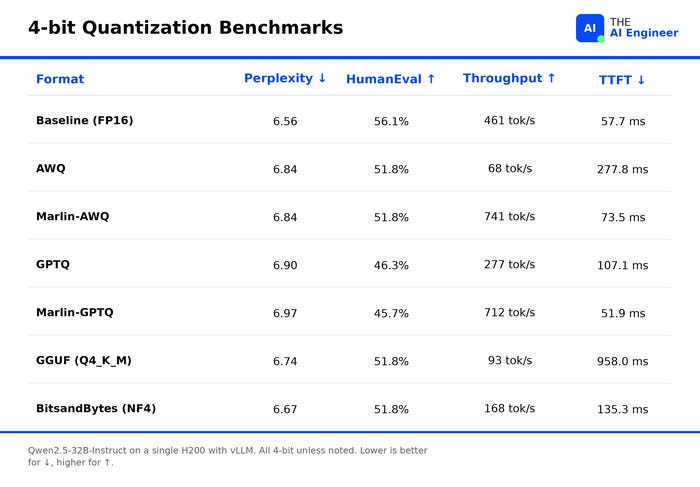
Quality is nearly a wash. All four 4-bit formats stay within 6% of full-precision perplexity (a standard measure of how well the model predicts text). On HumanEval, the code-generation benchmark, AWQ and GGUF both score 51.8% (only ~4 points under the FP16 baseline of 56.1%). GPTQ trails at 46%. The likely reason: GPTQ quantizes weights one column at a time and propagates each column’s error forward, so by the end of a long matrix the cumulative drift hurts multi-step tasks like writing code more than it hurts predicting the next single token.
Speed is almost entirely about the kernel, not the format. “Kernel” here means the GPU code that does the matrix math at inference time. AWQ with vLLM’s default kernel runs at 68 tokens per second on an H200, slower than the FP16 baseline (461 tok/s). Swap to Marlin (a kernel specifically designed for 4-bit weights) and the same AWQ weights run at 741 tok/s. A 10.9x speedup, same checkpoint, same GPU, just a different piece of code reading the weights4.
GGUF is fast where it was built to run, slow everywhere else. Inside vLLM, GGUF Q4_K_M posts 93 tok/s and takes nearly a full second to produce the first token, because vLLM has to unpack GGUF’s storage layout into something its GPU kernels can read every single time the model runs. Move the same file to llama.cpp, where the kernels were built around that layout, and the same model hits production-grade speed on a laptop or Mac.
4-bit can actually be faster than FP16 on the right kernel. Marlin-GPTQ produces its first token in 51.9 ms; FP16 takes 57.7 ms. The reason: at FP16, reading the model’s 64 GB of weights from GPU memory is the bottleneck. At 4-bit, the weights are 16 GB. Less data to move, faster first token, even though the math is the same. Quantization isn’t only a memory trick; on the right kernel, it’s a latency trick too.
Head-to-Head Breakdown
GPTQ: the established choice that needs the right kernel
GPTQ was the first algorithm to quantize 65B+ models in hours rather than days. That speed advantage made it the default for the 2023 wave of open-weights LLMs, which is why TheBloke (a single Hugging Face contributor) was able to publish thousands of GPTQ-Int4 versions in months and lock in the largest single quant catalog on the platform. The quality limit comes from the column-wise update: errors compound across columns, which shows up more on code than on text.
👍 The good:
Largest pre-quantized catalog on Hugging Face, thanks to a 12-month head start.
With Marlin, throughput hits 712 tok/s on H200, 1.5x faster than full-precision, because 4-bit weights are 4x smaller and therefore 4x faster to read from GPU memory.
Lowest first-token latency of any 4-bit method tested (51.9 ms), for the same reason.
👎 The bad:
GPU-only; no path to run on CPU or Apple Silicon.
Without Marlin, throughput drops to 276 tok/s (slower than full-precision baseline) because the older GPTQ kernels can’t combine dequantization and matrix math the way Marlin does.
Code-generation accuracy lands 6 points below AWQ.
🎯 Best for: GPU production stacks where the model you need has a GPTQ checkpoint but no AWQ one, or teams that have already built tooling around GPTQ and would pay more in switching costs than they’d gain from AWQ’s 6-point accuracy lift.
⚠️ The ceiling: GPTQ’s column-by-column rounding accumulates error over long output sequences, so it lags on code and reasoning benchmarks. If those are your main workloads, migrate to AWQ.
📡 Practitioner signal: Native in all three major NVIDIA serving stacks (vLLM, TGI, TensorRT-LLM), so you can swap engines without re-quantizing.
AWQ: the production sweet spot for vLLM
AWQ took a different bet than GPTQ. In any LLM, a small fraction of weights carry most of the model’s behavior. Protect those weights from rounding error and you can let everything else absorb the loss. AWQ finds them by running sample prompts through the model and watching which weight columns get multiplied by the largest activations: those are the ones whose errors compound into the biggest output errors. AWQ then multiplies those columns by a scaling factor (say, 4) before rounding. The rounding step still has the same precision (16 values), but the important weights now occupy a larger range, so the rounding error becomes a smaller fraction of each weight’s value. At inference time, AWQ divides the matching input activations by 4. The math cancels: the model produces the same output it would have without scaling, except the rounding damage on the important columns is much smaller.
👍 The good:
Highest 4-bit quality of the three: 51.8% on code generation, 6.84 on perplexity. The per-column scaling concentrates accuracy where it matters.
Best speed-quality tradeoff inside vLLM with Marlin: 741 tok/s, 12.6 ms between tokens.
Native in NVIDIA’s TensorRT-LLM, so the same AWQ file works across both major NVIDIA serving stacks.
👎 The bad:
Marlin only runs on NVIDIA GPUs from the Turing generation onward (2018+). Older cards (V100, GTX 10-series) can’t use it.
Catalog is younger than GPTQ’s, so niche or freshly-released models sometimes don’t have an AWQ version yet.
🎯 Best for: vLLM in production on an NVIDIA GPU from 2018 or newer, when the model you’re serving has a published AWQ checkpoint.
⚠️ The ceiling: Without Marlin, AWQ collapses to 68 tok/s because the default vLLM kernel decompresses weights back to 16-bit on every operation. The quality advantage only translates into real wins when Marlin is in your stack. Before picking AWQ, verify your vLLM version supports it and your GPU is recent enough.
📡 Practitioner signal: Qwen ships official AWQ checkpoints for every Qwen2.5 release, same day as FP16. When the model creator treats AWQ as launch-tier, the format is safe to bet on.
GGUF: the universal CPU/Apple format that’s not really a competitor
GGUF is the file format that made running LLMs on a laptop feasible. It’s a self-contained binary file: weights, tokenizer, and metadata in one file. It loads almost instantly because the operating system maps the file directly into memory instead of copying it. Q4_K_M is the community default because it’s the only Q-level that consistently stays within 1% of full-precision quality at under 5 effective bits per weight.
👍 The good:
Built-in kernels for Intel and AMD CPUs, Apple Silicon, and Apple GPUs, so the same file runs on a Mac laptop, a Linux server, or a Raspberry Pi without conversion.
No calibration step required, which means pre-quantized GGUF builds ship faster than AWQ or GPTQ.
Best quality preservation of the three formats (6.74 perplexity vs AWQ’s 6.84) because GGUF stores more scale values per weight matrix than the other two.
👎 The bad:
93 tok/s with a nearly one-second wait for the first token inside vLLM, because vLLM has to translate GGUF’s storage layout into something its GPU kernels can read every single time the model runs.
GGUF’s speed comes from kernels built around its layout, and vLLM doesn’t ship those.
🎯 Best for: any deployment that runs outside an NVIDIA GPU box: laptops, Macs, single-user CPU servers, or setups where some model layers live in GPU memory and others in system RAM.
⚠️ The ceiling: llama.cpp serves one request at a time. Throughput per request is good, but it doesn’t scale to multiple concurrent users the way vLLM does. Past roughly 5 concurrent users on the same machine, switch to vLLM and re-quantize to AWQ.
📡 Practitioner signal: default format on r/LocalLLaMA, the largest hobbyist LLM community on Reddit (~400K members). That matters because it’s the leading indicator of which models get GGUF builds first when new weights drop. Native in every major local inference tool: llama.cpp, Ollama, LM Studio, koboldcpp, jan.
The Decision Flowchart
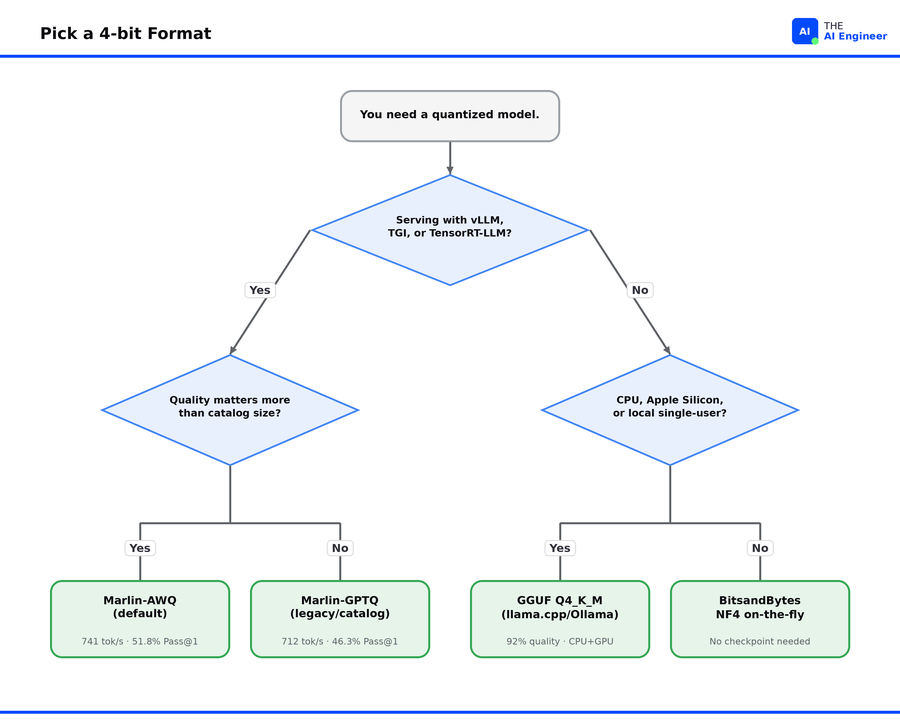
Are you serving on NVIDIA with vLLM (or TGI, or TensorRT-LLM)? The choice is between GPTQ and AWQ, both running through Marlin kernels. AWQ wins on quality (51.8% vs 46.3% on code generation) because its activation-aware scaling protects the most important weights from rounding damage that GPTQ’s column-by-column process can introduce. Pick GPTQ only when the model you need has a GPTQ checkpoint but no AWQ one; otherwise AWQ is the default.
Are you running on CPU, Apple Silicon, or want to split a model between GPU and RAM on consumer hardware? GGUF Q4_K_M. The format ships with kernels for Intel CPUs, AMD CPUs, ARM chips, and Apple GPUs through llama.cpp, so the same file runs on every consumer machine. Inside vLLM, that same file drops to 93 tok/s because vLLM can’t read its layout efficiently. Match the format to the runtime.
Are you fine-tuning? None of the three formats in the title support training their pre-quantized weights directly. Use QLoRA on the original 16-bit model, train small adapter layers on top, then merge or convert. Or fine-tune in full precision and quantize after.
If you don’t know what hardware you’re serving on yet, download the GGUF first. The file contains everything needed to run the model in one binary, so it’s the most portable. If your final stack ends up being vLLM, re-quantize from the original 16-bit weights at that point.
The Honest Take
The quality gaps are smaller than the kernel gaps. All four 4-bit formats land within ~6% of full-precision quality, and within 4 to 5 points on code generation. The same AWQ weights run at 68 or 741 tok/s depending on whether Marlin is in the stack. So when the format and the kernel are separated (as they are in vLLM, where the kernel is something you swap independently), the kernel choice swamps the format choice by an order of magnitude. GGUF is the exception: format and kernel are bound together, which is why measuring GGUF in vLLM is measuring the wrong runtime.
The 4-bit market is commoditizing. Three different approaches to picking the 16 representative values, all landing within 4 percentage points on code generation, all dominated by the same handful of GPU kernels once you ship them. The reason: every modern method preserves about ~99% of the model’s behavior, so quality differences shrink; but kernel maturity varies by orders of magnitude, so speed differences grow. The answer collapses to one rule: match the format to the runtime.
Bitsandbytes deserves a second look if you’re tired of the format-checkpoint shuffle. It posts the lowest perplexity in the benchmark (6.67) and ties AWQ and GGUF at 51.8% on code generation, because its NF4 quantization concentrates the 16 available values near zero (where most LLM weights actually sit) instead of spacing them evenly across the range. The downside is throughput in vLLM (168 tok/s), and the fact that 8-bit bitsandbytes isn’t yet supported in vLLM at all. For prototyping and for QLoRA fine-tuning, doing the quantization at load time removes a step that the other formats require offline.
Most quantization “failures” are self-inflicted. Running GGUF through vLLM and concluding GGUF is slow. Running AWQ without Marlin and concluding AWQ is slow. Comparing 4-bit quality on a generic benchmark and assuming the gap survives on your data. Each of these mistakes shares a root cause: measuring the format in isolation, not the format-kernel-workload combination that actually ships.
The One Thing to Remember
The decision isn’t really GPTQ vs AWQ vs GGUF. It’s downstream of your serving stack, because the kernels each stack supports determine which formats can run fast on it.
If you’ve committed to vLLM on NVIDIA, you’re in the Marlin ecosystem, and the choice is between AWQ (better accuracy on code and reasoning) and GPTQ (broader model coverage). If you’ve committed to Ollama or llama.cpp, GGUF is the only format with native kernels there, and the only remaining choice is which Q-level you want (higher Q = better quality, larger file). If you haven’t committed yet, defer the quantization choice: prototype in full precision, pick your serving stack based on workload (many concurrent users → vLLM; single user or local → llama.cpp), then quantize last.
💬 Which 4-bit format does your team actually run in production, and what made you pick it? Reply with the format and the serving framework. I’m collecting the patterns for an upcoming Saturday deep-dive on what’s actually deployed at scale.
Where to Next?
📖 Go Deeper: vLLM vs Ollama vs SGLang vs TensorRT-LLM. Picking a 4-bit format is half the deployment decision. The other half is which serving framework runs the model.
🔗 Go Simpler: What is Quantization?. The first-principles explainer this issue is built on. Start here if any of the math above felt rushed.
🔀 Go Adjacent: What Does NVIDIA Actually Do?. Why the Marlin kernel matters as much as the algorithm, and why NVIDIA’s hardware moat is the kernel ecosystem, not the chips.
🗺️ If you are transitioning into AI engineering, How to Break Into AI Engineering in 2026 is the full roadmap on getting there
🔜 Tuesday: What Does Pinecone Actually Do? The architecture behind the first managed vector database, demystified.
GGUF Format Documentation (2026)
Marlin: Mixed-precision Auto-regressive Parallel Inference on Large Language Models (Aug. 2024)
Great article with enough depth.